# Tina4 Framework - Full Documentation
One file with the whole Tina4 documentation, for language models and tools that
read a single text file. The curated map is at https://tina4.com/llms.txt. For a
queryable, always-current version, ask https://rag.tina4.com/v1/ask. When a Tina4
dev server is running, its /__dev/mcp tools are the exact source for API signatures.
Generated: 2026-09-17T12:16:23Z
================================================================================
FILE: build-with-ai.md
================================================================================
# Build with the AI Coder
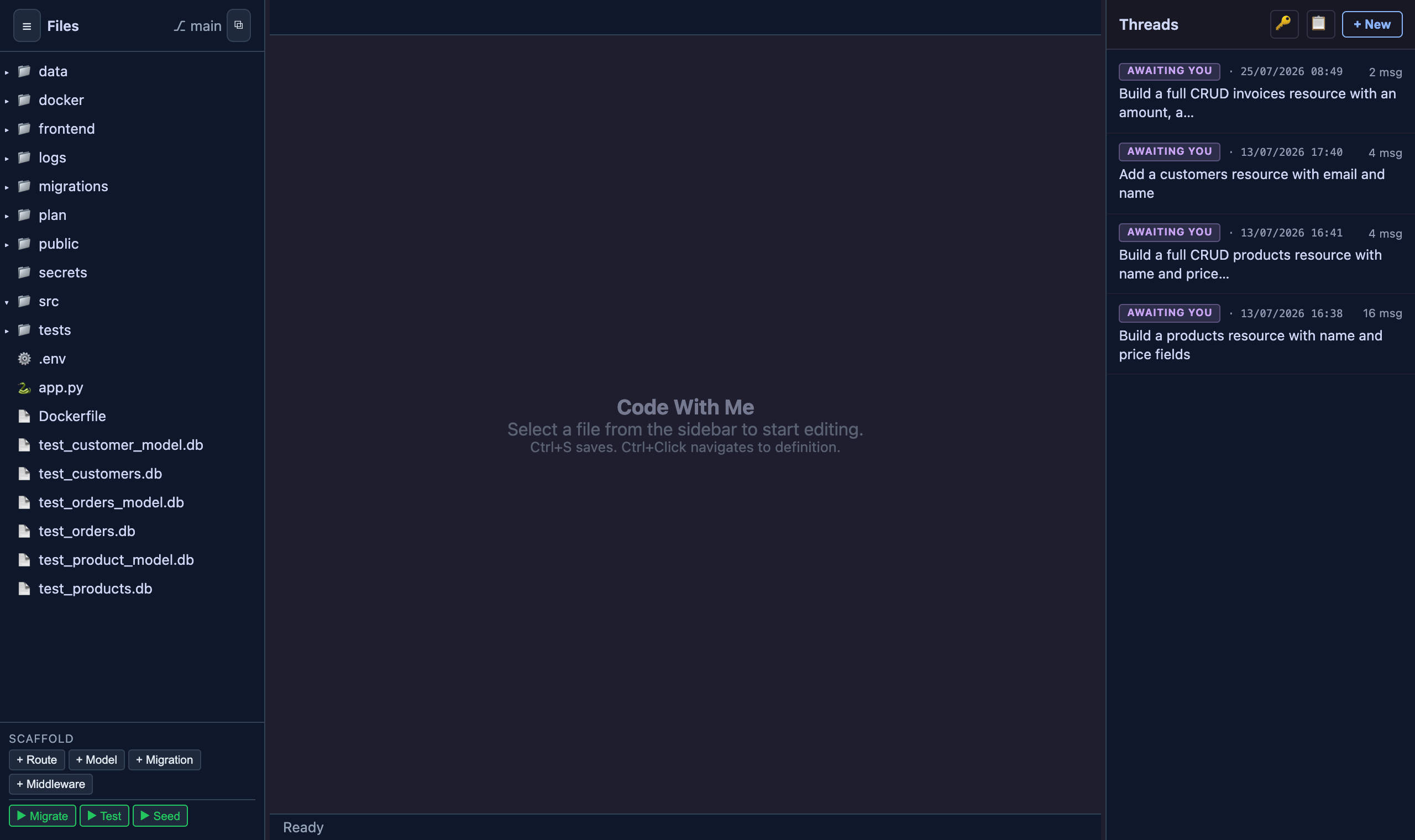
Every Tina4 project ships with an AI coder in the dev admin. Describe what you
want and it scaffolds the resource, runs the tests, and serves the result live,
you watch the endpoint go from 404 to 200 without a restart.
## Start building
1. Start the project:
```bash
tina4 serve
```
2. Open the dev admin at `/__dev` on your running app, for example
`http://localhost:7146/__dev`.
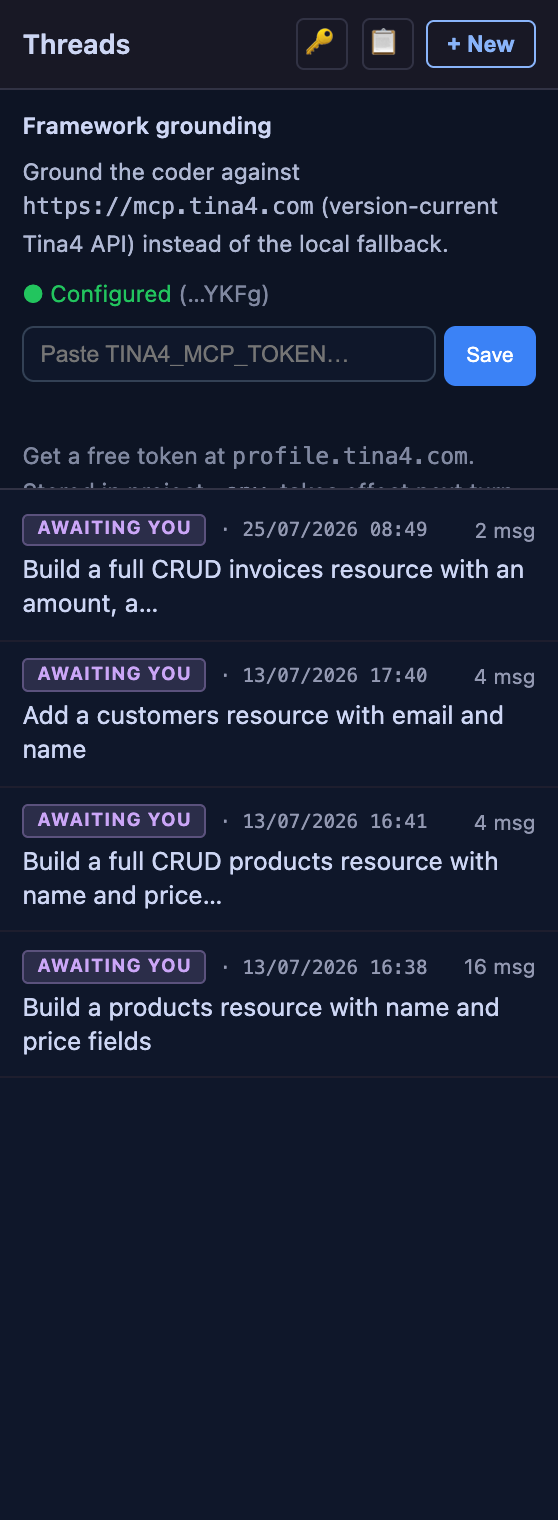
3. Add your Tina4 MCP key. Click the key icon in the **Threads** panel, paste
your key, and press **Save**. Get a free key from your account at
[profile.tina4.com](https://profile.tina4.com). The key saves to your project `.env`
as `TINA4_MCP_TOKEN` and takes effect on the next turn, no restart. The
panel shows a green **Configured** status once it lands.
{width=340}
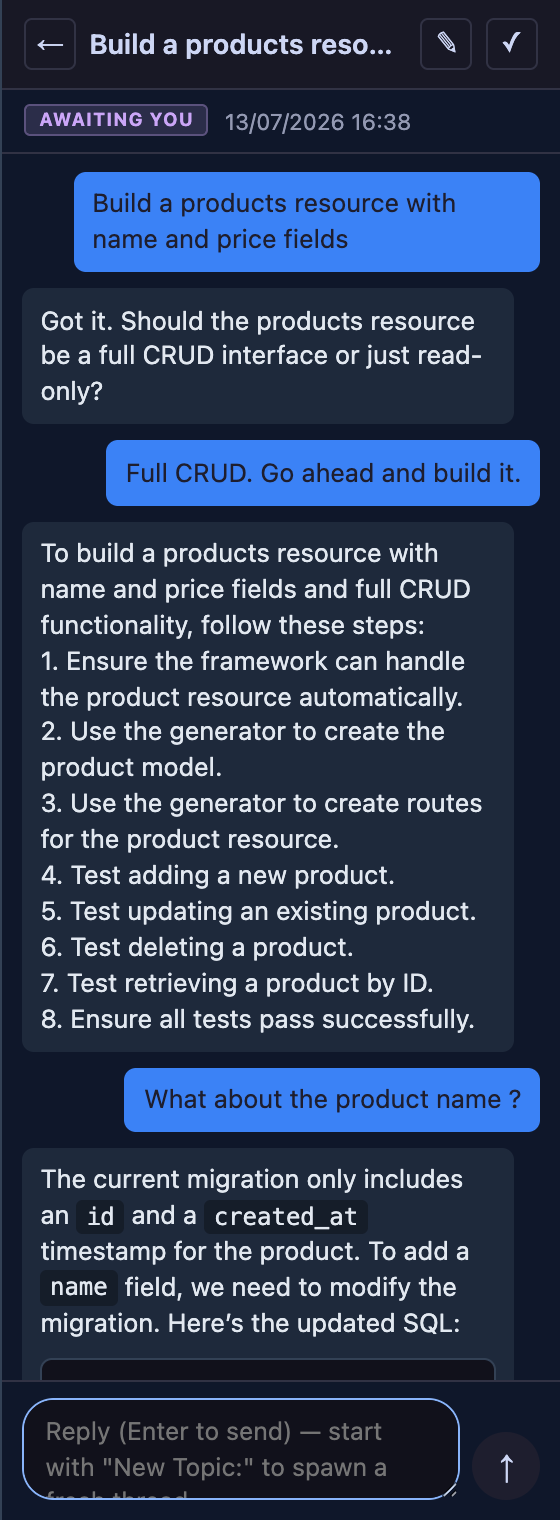
4. Ask for what you want. In the **Threads** panel, type a request such as
`Build a products resource with name and price fields`. The coder generates
the model, the CRUD routes and their tests, runs them, migrates the database,
and reloads, then reports the live endpoint.
{width=340}
## Why the key matters
The key grounds the coder against the current Tina4 API, so it writes correct,
idiomatic code for your language instead of guessing. It reaches the
version-current API at `https://mcp.tina4.com` rather than a local fallback, so
the generated field types, route decorators, and ORM calls match the framework
you are running. Without a key the coder still runs, falling back to a local
reference.
## What the coder does for you
Each request runs through the same loop the framework uses by hand:
- **Scaffolds first.** It runs the built-in generators for models, routes, and
migrations, so the boilerplate is framework-correct before a line of custom
logic is written.
- **Writes the tests.** Every resource comes with real tests, positive and
negative, and the coder runs them, so a green build is a build that works.
- **Migrates and reloads.** The database migration runs and the routes reload in
place. The new endpoint serves on the next request, with no restart.
- **Reports proof.** You get the created files, the test result, and the live
endpoint back in the thread, the evidence that the build works, not just a
claim that it does.
## Expose your own tools over MCP
The coder reaches Tina4 over MCP. Your app can speak it too. Every framework
ships an MCP server. A built-in one exposes framework internals for AI-assisted
development, and a small API lets you build your own to expose business logic, a
customer lookup, an invoice query, an inventory check, straight to any AI
assistant.
Two chapters per language cover it end to end:
| Language | Built-in dev tools | Build your own server |
|---|---|---|
| Python | [MCP Dev Tools](/python/28-mcp-dev-tools) | [Custom MCP Servers](/python/29-custom-mcp-servers) |
| Node.js | [MCP Dev Tools](/nodejs/28-mcp-dev-tools) | [Custom MCP Servers](/nodejs/29-custom-mcp-servers) |
| PHP | [MCP Dev Tools](/php/28-mcp-dev-tools) | [Custom MCP Servers](/php/29-custom-mcp-servers) |
| Ruby | [MCP Dev Tools](/ruby/28-mcp-dev-tools) | [Custom MCP Servers](/ruby/29-custom-mcp-servers) |
Register a tool, add the type hints, and the schema writes itself. Point Claude
Code at the endpoint and ask in plain language. The protocol does the rest.
================================================================================
FILE: cheatsheet.md
================================================================================
# Tina4 Cheatsheet
One page, four frameworks, side by side. Find what you need, copy the column for your language.
> **Verified only.** Every entry on this page has been run green across **all four frameworks** (Python · PHP · Ruby · Node), not transcribed from docs. Each section notes how it was checked. Sections are added only once they pass that bar, so this page is short on purpose and grows as more is verified.
## Routing {#routing}
> Verified by a live cross-framework code review plus the routing test suites in all four (Python · PHP · Ruby · Node, run green this release): method registration, `{id}` params, and typed-param coercion.
Drop a handler file in `src/routes/` (auto-discovered) and register one per HTTP method:
| | Python | PHP | Ruby | Node |
|---|---|---|---|---|
| Register | `@get("/p")` · `@post` · `@put` · `@patch` · `@delete` | `Router::get("/p", $fn)` · `post` · `put` · `patch` · `delete` | `Tina4::Router.get("/p") { \|req, res\| ... }` · `post` · ... | `get("/p", h)` · `post` · `put` · `patch` · `del` |
| Path param | `@get("/users/{id}")` | `Router::get("/users/{id}", $fn)` | `Tina4::Router.get("/users/{id}")` | `get("/users/{id}", h)` |
| Typed param | `{id:int}` · `{p:float}` | `{id:int}` · `{p:float}` | `{id:int}` · `{p:float}` | `{id:int}` · `{p:float}` |
- **`{id}` is the param syntax everywhere**, never `:id`. Read it with `request.param("id")` (PHP `$request->params["id"]`, Ruby `params[:id]`, Node `req.params.id`).
- **Typed params arrive coerced:** `{id:int}`/`{id:integer}` → a native integer, `{p:float}`/`{p:number}` → a native float; `string`/`alpha`/`alnum`/`slug`/`uuid`/`path` and an untyped `{id}` stay strings. The type also constrains matching: `/users/abc` → 404 for `{id:int}`. An unknown type name is rejected at registration.
- **Returning data:** `return response(obj)` (Node: `return res.json(obj)`): objects/dicts/arrays → JSON, strings → HTML; ORM models, lists of models, and `DatabaseResult`s auto-serialize to JSON.
---
## Auth {#auth}
> Verified by a live cross-framework code review plus the auth / route-protection suites in all four (Python · PHP · Ruby · Node, run green this release): default protection, opt-out/opt-in, JWT, password hashing.
**GET routes are public; POST / PUT / PATCH / DELETE require a Bearer token by default**, the same convention in every framework. A write request with no valid token gets `401`.
| | Python | PHP | Ruby | Node |
|---|---|---|---|---|
| Open a write route | `@noauth()` | `Router::post(...)->noAuth()` | `Tina4::Router.post(...).no_auth` | `post(...).noAuth()` |
| Protect a GET | `@secured()` | `Router::get(...)->secure()` | `Tina4::Router.get(...).secure` | `get(...).secure()` |
| Issue a JWT | `get_token({"id": 1}, expires_in=60)` | `Auth::getToken(["id"=>1], null, 60)` | `Tina4::Auth.get_token({id: 1}, expires_in: 60)` | `getToken({id: 1}, secret, 60)` |
| Validate a JWT | `valid_token(t)` | `Auth::validToken($t)` | `Tina4::Auth.valid_token(t)` | `validToken(t)` |
| Hash / check password | `Auth.hash_password(pw)` / `Auth.check_password(pw, h)` | `Auth::hashPassword($pw)` / `Auth::checkPassword($pw, $h)` | `Tina4::Auth.hash_password(pw)` / `Tina4::Auth.check_password(pw, h)` | `hashPassword(pw)` / `checkPassword(pw, h)` |
- **JWT expiry is in minutes** (default 60) in all four. `valid_token` returns the decoded **payload** (truthy) on success, `null`/`None` on failure, not a bool.
- A protected route accepts the token from the **`Authorization: Bearer` header, a `formToken` body field, or the session**, checked in that order.
- Passwords hash with **PBKDF2-SHA256** (260 000 iterations, `pbkdf2_sha256$...` format); the check is timing-safe and always takes **`(password, hash)`** in that order.
---
## Session {#session}
> Verified by a live cross-framework code review + the session suites in all four (Python · PHP · Ruby · Node, run green this release), including the database backend on live Firebird 5.0.4.
Auto-started. Every route handler gets `request.session` ready, no setup for the default file backend.
| | Python | PHP | Ruby | Node |
|---|---|---|---|---|
| Read a value | `request.session.get("user")` | `$request->session->get("user")` | `request.session.get("user")` | `req.session.get("user")` |
| Write a value | `request.session.set("user", data)` | `$request->session->set("user", $data)` | `request.session.set("user", data)` | `req.session.set("user", data)` |
| New id after login | `request.session.regenerate()` | `$request->session->regenerate()` | `request.session.regenerate` | `req.session.regenerate()` |
| Off-request, by id | `Session().start(sid)` | `(new Session())->start($sid)` | `Tina4::Session.new({}).start(sid)` | `new Session().start(sid)` |
- **There is no global session, by design.** A session is keyed to the browser's cookie, so `request.session` is always the current visitor's and never anyone else's; a process-wide session would leak one user's data into another's request. Off a request, rebuild it from a known session id (last row). A background task carries no session, so pass it the user id or session id when you enqueue it.
- **Token-auth trap:** a client that sends an `Authorization: Bearer` token and no session cookie gets a fresh, empty session every request, so writing to it saves nothing that survives. There the token is the identity: read it with `Auth.authenticate_request(headers)` instead of storing on the session.
- **The class lives at `session`, not `core.session`.** To construct one off-request, import it: `from tina4_python.session import Session` (Python), `use Tina4\Session;` (PHP), `Tina4::Session` (Ruby, no import), `import { Session } from "tina4-nodejs"` (Node). There is no `tina4_python.core.session` and no global `session` object.
- Pick the backend with `TINA4_SESSION_BACKEND` (`file` default, `redis`, `valkey`, `mongodb`, `memcached`, `database`). `save()` is auto-called after the response; call it yourself only when you write off-request. Call `regenerate()` right after login to defeat session fixation.
---
## Background tasks {#background}
> Periodic work in the server event loop, no threads and no extra processes. Registering returns a stop-handle in all four; a task carries no request, so it has no session or current user.
| | Python | PHP | Ruby | Node |
|---|---|---|---|---|
| Register a task | `background(job, interval=2.0)` | `$app->background($job, 2.0)` | `Tina4::Background.register(interval: 2.0) { job }` | `background(job, 2)` |
| Stop it | `task.stop()` | `$handle->stop()` | `Tina4::Background.stop_task(task)` | `task.stop()` |
```python
# Python: the import path is core.server, not tina4_python.background
from tina4_python.core.server import background
task = background(lambda: drain_queue(), interval=2.0) # runs every 2 seconds
task.stop() # ends and deregisters it
```
- **Import it from `core.server`, not `tina4_python.background`.** Python: `from tina4_python.core.server import background`. Node: `import { background } from "tina4-nodejs"`. PHP and Ruby need no import: `$app->background(...)` is a method on your `App`, and Ruby calls `Tina4::Background.register`. There is no `tina4_python.background` module.
- **The interval is seconds** (a float), and the callback takes no arguments. Use background for periodic in-process work (a health poll, a queue drain, a simulator). Never use a raw thread or a separate process; the handle stops and deregisters the task cleanly on shutdown.
- **A background task has no request**, so it has no `request.session` and no current user. Pass it the user id or session id it needs when you register it (see Session).
---
## Request {#request}
> Verified by a live cross-framework code review + the request test suites in all four (Python · PHP · Ruby · Node, run green this release).
| | Python | PHP | Ruby | Node |
|---|---|---|---|---|
| Parsed body | `request.body` | `$request->body` | `request.body` | `req.body` |
| Query param | `request.query["q"]` | `$request->query["q"]` | `request.query["q"]` | `req.query.q` |
| Header (any case) | `request.headers["Content-Type"]` | `$request->headers["Content-Type"]` | `request.headers["Content-Type"]` | `req.headers["content-type"]` |
| Cookie | `request.cookies["sid"]` | `$request->cookies["sid"]` | `request.cookies["sid"]` | `req.cookies.sid` |
| Uploaded file | `request.files["doc"]["content"]` | `$request->files["doc"]["content"]` | `request.files["doc"]["content"]` | `req.files.doc.content` |
- **Body is the parsed payload:** a JSON or form-urlencoded POST becomes a dict/array/hash. (For the raw string, Ruby exposes `request.body_raw`.)
- **`request.query` is the query string only:** route params like `{id}` come from the path (see Routing). Headers are **case-insensitive** in every framework.
- **Uploaded files are raw bytes, never base64:** each entry has `filename`, `type`, `content` (the bytes), `size`.
---
## Response {#response}
> Verified by a live cross-framework code review + the response / SSE test suites in all four (Python · PHP · Ruby · Node, run green this release).
| | Python | PHP | Ruby | Node |
|---|---|---|---|---|
| JSON (+ status) | `return response(data, 201)` | `return $response($data, 201)` | `response.json(data, 201)` | `return res.json(data, 201)` |
| Redirect | `response.redirect(url)` | `$response->redirect($url)` | `response.redirect(url)` | `res.redirect(url)` |
| Serve a file | `response.file(path)` | `$response->file($path)` | `response.file(path)` | `res.file(path)` |
| Stream / SSE | `response.stream(gen)` | `$response->stream($gen)` | `response.stream(gen)` | `res.stream(gen)` |
| Custom header | `response.add_header(k, v)` | `$response->header(k, v)` | `response.add_header(k, v)` | `res.addHeader(k, v)` |
- **Send through the response object:** objects/dicts/arrays → JSON, strings → HTML; ORM models, lists of models, and `DatabaseResult`s auto-serialize. Always call `response(...)` / `res.json(...)`: it works in all four (PHP and Ruby also serialize a bare `return [...]`, but the explicit call is portable).
- `response(data, 201)` sets the status; **redirect** defaults to 302; **file** auto-detects the MIME type and returns 404 if the file is missing; **stream** sends an SSE-ready `text/event-stream`, so pass a generator.
---
## Database
> Verified live on PostgreSQL across all four (connection pool round-robin run, this release).
| | Python | PHP | Ruby | Node |
|---|---|---|---|---|
| Connect | `Database("postgres://...")` | `Database::create("postgres://...")` | `Tina4::Database.new("postgres://...")` | `await initDatabase({url})` |
| Write, params | `db.execute("INSERT INTO t (a, b) VALUES (?, ?)", [1, "x"])` | `$db->execute("INSERT INTO t (a, b) VALUES (?, ?)", [1, "x"])` | `db.execute("INSERT INTO t (a, b) VALUES (?, ?)", [1, "x"])` | `await db.execute("INSERT INTO t (a, b) VALUES (?, ?)", [1, "x"])` |
| One row, params | `db.fetch_one("SELECT * FROM t WHERE id = ?", [1])` | `$db->fetchOne("SELECT * FROM t WHERE id = ?", [1])` | `db.fetch_one("SELECT * FROM t WHERE id = ?", [1])` | `await db.fetchOne("SELECT * FROM t WHERE id = ?", [1])` |
| Transaction | `db.start_transaction()` ... `db.commit()` / `db.rollback()` | `$db->startTransaction()` ... `$db->commit()` / `$db->rollback()` | `db.start_transaction` ... `db.commit` / `db.rollback` | `await db.startTransaction()` ... `await db.commit()` / `await db.rollback()` |
Always use `?` placeholders with a params array: every adapter translates `?` to the engine's native style (`$1`, `%s`, `?`). Never string-interpolate user input. A standalone write auto-commits on its own connection (durable + visible across a pooled connection); an explicit transaction stays atomic. Set `TINA4_AUTOCOMMIT=false` for strict manual-commit mode.
## Graph Database
> New in 3.13.111. Proven live across all four on Ultipa, Neo4j, Memgraph and ArangoDB. The engine driver is an optional, lazy-loaded dependency, so the core stays zero-dependency.
| | Python | PHP | Ruby | Node |
|---|---|---|---|---|
| Connect | `GraphDatabase.create("neo4j://host:7687", username="u", password="p")` | `GraphDatabase::create("neo4j://host:7687", "u", "p")` | `Tina4::GraphDatabase.create("neo4j://host:7687", username: "u", password: "p")` | `await GraphDatabase.create("neo4j://host:7687", {username, password})` |
| From env | `GraphDatabase.from_env()` | `GraphDatabase::fromEnv()` | `Tina4::GraphDatabase.from_env` | `await GraphDatabase.fromEnv()` |
| Add node | `g.add_node("Person", {"name": "Alice"})` | `$g->addNode("Person", ["name" => "Alice"])` | `g.add_node("Person", { "name" => "Alice" })` | `await g.addNode("Person", {name: "Alice"})` |
| Add edge | `g.add_edge(a.id, b.id, "KNOWS", {"since": 2020})` | `$g->addEdge($a->id, $b->id, "KNOWS", ["since" => 2020])` | `g.add_edge(a.id, b.id, "KNOWS", { "since" => 2020 })` | `await g.addEdge(a.id, b.id, "KNOWS", {since: 2020})` |
| Neighbors | `g.neighbors(a.id, direction="out", edge_type="KNOWS", limit=50)` | `$g->neighbors($a->id, "out", "KNOWS", 50)` | `g.neighbors(a.id, direction: "out", edge_type: "KNOWS", limit: 50)` | `await g.neighbors(a.id, {direction: "out", edgeType: "KNOWS", limit: 50})` |
| Traverse | `g.traverse(a.id, depth=3, direction="out", edge_type="KNOWS")` | `$g->traverse($a->id, 3, "out", "KNOWS")` | `g.traverse(a.id, depth: 3, direction: "out", edge_type: "KNOWS")` | `await g.traverse(a.id, {depth: 3, direction: "out", edgeType: "KNOWS"})` |
| Raw query | `g.query("MATCH (n) RETURN n", params)` | `$g->query("MATCH (n) RETURN n", $params)` | `g.query("MATCH (n) RETURN n", params)` | `await g.query("MATCH (n) RETURN n", params)` |
The URL scheme picks the engine: `ultipa://` (GQL), `neo4j://` / `memgraph://` / `bolt://` (Bolt/Cypher, one adapter), `arango://` (AQL). The portable core (`add_node` / `add_edge` / `get_node` / `update_node` / `delete_node` / `neighbors` / `traverse`) works identically on every engine; `query` and `execute` pass native statements straight through. Configure with `TINA4_GRAPH_URL` and `TINA4_GRAPH_CONNECT_TIMEOUT`.
## Pages: drop-in templates {#pages}
> Verified by the landing-page / template-routing test suites in all four (Python 43, PHP 44, Ruby 45, Node 55, run green this release).
Drop a `.twig` (or `.html`) file into `src/templates/pages/` and it serves at the matching URL, no route needed. Same convention in all four frameworks.
| File | URL |
|---|---|
| `src/templates/pages/index.twig` | `/` |
| `src/templates/pages/cars.twig` | `/cars` |
| `src/templates/pages/admin/users.twig` | `/admin/users` |
- **Only `pages/` auto-routes:** `base.twig`, partials, layouts, and `errors/` live in `src/templates/` outside `pages/` and are render-only (`response.render(...)`), never URL-exposed.
- **`_`-prefixed files are private:** `pages/_partial.twig` won't serve.
- **An explicit route always wins** over a same-path template.
- **Toggle:** `TINA4_TEMPLATE_ROUTING=off` (default on). Dev re-reads the directory each request; production caches the lookup at boot.
---
## Frond templates {#frond}
> Verified by a 50-case cross-engine harness (identical templates rendered through all four engines → identical output) plus a host-API check, this release. Frond is Tina4's built-in Twig/Jinja-compatible engine. **The template syntax below is identical in all four frameworks**, only the host call to render or extend it differs (table at the end).
### Output & filters
```twig
{{ name }} {# variable #}
{{ name | upper }} {# filter #}
{{ price | default(0) }} {# fallback for undefined/None #}
{{ "%.2f" | format(total) }} {# printf-style formatting #}
{{ "hello " ~ name }} {# string concatenation (~, not +) #}
{{ user.email | e }} {# HTML-escape (single - never double) #}
{{ html | raw }} {# unescaped output (also: | safe) #}
```
Verified filters: `upper` `lower` `length` `trim` `capitalize` `title` `default` `format` `e`/`escape` `raw`/`safe` `json_encode` `replace` `join` `first` `last` `reverse` `sort` `abs` `round` `striptags` `slice` `nl2br` `url_encode`.
### Conditionals & loops
```twig
{% if balance > 0 %}In credit{% elif balance == 0 %}Even{% else %}Owing{% endif %}
{{ count != 1 ? 's' : '' }} {# ternary #}
{{ 's' if count != 1 else '' }} {# Python-style ternary also works #}
{% for item in items %}
{{ loop.index }}. {{ item.name }}{% if loop.last %} (last){% endif %}
{% endfor %}
```
`loop.index` (1-based), `loop.index0`, `loop.first`, `loop.last`, `loop.length`. Tests: `is defined` · `is even` · `is odd` · `is null` · plus any you register with `add_test`.
### Inheritance, includes & macros
```twig
{# base.twig #}
{% block title %}Tina4{% endblock %}
{% block content %}{% endblock %}
{# page.twig #}
{% extends "base.twig" %}
{% block content %}{% include "partials/nav.twig" %}{% endblock %}
{# macros/forms.twig - macros do NOT inherit context, pass vars explicitly #}
{% macro field(name, label) %}{% endmacro %}
{% from "macros/forms.twig" import field %}
{{ field("email", "Email") }}
```
### Set, comments, whitespace, raw, cache
```twig
{% set total = price * qty %}
{# this is a comment - not rendered #}
{%- if trim -%}no surrounding whitespace{%- endif -%}
{% raw %}{{ this is output literally }}{% endraw %}
{% cache "sidebar" 300 %}...expensive fragment cached 300s...{% endcache %}
```
### Forms & tokens
```twig
```
### The only part that differs: the host call
```python
# Python # PHP # Ruby # Node
frond.render("p.twig", d) $frond->render("p.twig", d) frond.render("p.twig", d) frond.render("p.twig", d)
frond.add_filter("money", fn) $frond->addFilter("money", $fn) frond.add_filter("money"){ |v| ... } frond.addFilter("money", fn)
frond.add_global("APP", v) $frond->addGlobal("APP", v) frond.add_global("APP", v) frond.addGlobal("APP", v)
frond.add_test("positive", fn) $frond->addTest("positive", $fn) frond.add_test("positive"){ |v| ... } frond.addTest("positive", fn)
```
From a route, `response.render("pages/x.twig", data)` (PHP `$response->render`, Node `res.render`) renders a template with data.
---
## MCP servers {#mcp}
> Verified by running each framework's MCP suite green on the lab this release (Python 82 · PHP 121 · Ruby 102 · Node 7 files, 0 failures) against the real `McpServer` over its real transport, no mocks: server creation, tool and resource registration, the `tools/call` JSON-RPC round-trip, and the security gate.
Expose your own application logic to an AI assistant. Register tools and resources on a path, mount it, point Claude Code at the endpoint. Same concept in all four, idiomatic names per language.
| | Python | PHP | Ruby | Node |
|---|---|---|---|---|
| Create a server | `McpServer("/crm/mcp", name="CRM")` | `new McpServer("/crm/mcp", name: "CRM")` | `Tina4::McpServer.new("/crm/mcp", name: "CRM")` | `new McpServer("/crm/mcp", "CRM")` |
| Register a tool | `@mcp_tool("find", server=mcp)` | `#[McpTool("find", server: "crm")]` | `Tina4.mcp_tool("find", server: mcp) { \|a\| ... }` | `mcpTool("find", "desc", mcp, [params])(fn)` |
| Register a resource | `@mcp_resource("crm://p", server=mcp)` | `#[McpResource("crm://p", server: "crm")]` | `Tina4.mcp_resource("crm://p", server: mcp) { ... }` | `mcpResource("crm://p", "desc", "application/json", mcp)(fn)` |
| Mount the routes | `mcp.register_routes(router)` | `$mcp->registerRoutes($router)` | `mcp.register_routes` | `mcp.registerRoutes(router)` |
- **The signature is the schema.** Python and PHP read the function or method type hints; Ruby and Node take an explicit params list (`{name, type, default}`). A parameter with a default is optional, every other one is required, and an assistant cannot call a tool whose types it cannot see, so type every one.
- **Return structured data**, a dict, a row, a list, never a preformatted string. The server wraps it as MCP content and lets the assistant format it for the user.
- **The endpoints are born with the server.** `POST /crm/mcp` speaks Streamable HTTP (send JSON-RPC, read the reply inline; `initialize` hands back an `Mcp-Session-Id`), with legacy `POST /crm/mcp/message` and `GET /crm/mcp/sse` for older clients. In PHP the `server:` argument is the server's string handle, not the object.
- **Public by default, so secure anything past localhost.** Protect the MCP path with the same auth you use on routes (secured routes or middleware), or check the bearer token inside the tool. Keep one server per domain (`/crm/mcp`, `/accounting/mcp`) and one focused query per tool. Full guide: the Custom MCP Servers chapter for your language, linked from [Build with AI](/build-with-ai).
---
## Coming as verified
These are written and being checked live across all four before they land here: ORM models & CRUD · QueryBuilder · relationships · migrations · middleware · caching · queues · websockets · swagger · graphql · events · i18n · logging · DI · fakedata · CLI.
## 📕 Download the book
The full Tina4 book covers every framework in depth. [Get it here](https://tina4.com).
================================================================================
FILE: comparisons.md
================================================================================
# Framework Comparisons
Tina4 ships in Python, PHP, Ruby, Node.js, JavaScript (frontend), and Delphi (FMX). Each variant targets a different language but follows the same project structure, the same routing conventions, and the same ORM API.
This page compares every Tina4 variant against popular frameworks in its language. The data covers performance benchmarks, a 44-capability comparison checklist, deployment size, and honest trade-offs.
**Methodology.** All benchmarks ran on an Apple Silicon ARM64 MacBook Pro (8 cores). The tool: `hey`, with 5,000 requests, 50 concurrency, three runs averaged. Two endpoints tested: a JSON object response and a 100-item list response. Benchmark scripts live at [github.com/tina4stack/tina4-documentation/benchmark/](https://github.com/tina4stack/tina4-documentation/benchmark/). Date: March 2026.
**What "of 44" means.** Every feature table below scores each framework against one fixed list of 44 capabilities. The list stays the same across all four languages, so the columns compare like with like: a framework at 24/44 covers 24 of those 44 capabilities. That 44 is a comparison denominator, not Tina4's feature count. For what Tina4 actually ships, read the complete feature list for your language, which enumerates every built-in feature with the class or method that provides it.
---
## Python
Tina4 Python runs ASGI on uvicorn. Async by default. Zero external dependencies.
### At a Glance
| Feature | Tina4 Python | FastAPI | Flask | Django | Starlette | Bottle |
|---|---|---|---|---|---|---|
| **Type** | Lightweight toolkit | Async API framework | Micro-framework (sync) | Full-stack framework | ASGI toolkit | Micro-framework |
| **Python Version** | 3.12+ | 3.8+ | 3.8+ | 3.10+ | 3.8+ | 3.x |
| **Routing** | Decorator-based, auto-discovery | Decorator + Pydantic | Blueprint-based | URL patterns, CBVs | Decorator-based | Decorator-based |
| **Templating** | Built-in Twig | None (use Jinja2) | Jinja2 | Django templates | None (use Jinja2) | Built-in simple |
| **Database/ORM** | Built-in (6 engines + MongoDB) | None (use SQLAlchemy) | None (use SQLAlchemy) | Built-in ORM (4 engines) | None | None |
| **API Docs** | Auto-Swagger at /swagger | Auto-Swagger/OpenAPI | Plugin required | Plugin required | None | None |
| **Auth/Security** | Built-in JWT, sessions, CSRF | Depends on deps | Extensions required | Built-in auth system | None | None |
| **WebSockets** | Built-in | Built-in | Plugin | Channels (plugin) | Built-in | No |
| **GraphQL** | Built-in | No | No | No | No | No |
### Performance (hey: req/s)
| Framework | JSON | List |
|---|---:|---:|
| Starlette | 15,664 | 9,302 |
| FastAPI | 11,523 | 2,709 |
| **Tina4** | **9,761** | **5,769** |
| Flask | 5,722 | 962 |
| Bottle | 3,165 | 1,105 |
| Django | 2,333 | 2,150 |
Starlette leads raw JSON throughput because it carries no middleware overhead. FastAPI sits on top of Starlette and adds Pydantic validation, which costs ~30% on JSON but drops list throughput to 2,709 req/s. Tina4 lands mid-pack on JSON and holds strong on list responses (5,769), where FastAPI and Flask fall off. Django handles both endpoints at a steady ~2,200 req/s with no dramatic drops. Bottle runs single-threaded, which limits its ceiling.
### Feature Comparison (44 features)
| # | Feature | Tina4 | Django | FastAPI | Flask | Starlette | Bottle |
|---|---|---|---|---|---|---|---|
| | **CORE WEB** | | | | | | |
| 1 | Routing (decorators) | Y | Y | Y | Y | Y | Y |
| 2 | Typed path parameters | Y | Y | Y | - | Y | - |
| 3 | Middleware system | Y | Y | Y | Y | Y | - |
| 4 | Static file serving | Y | Y | Y | Y | Y | Y |
| 5 | CORS built-in | Y | - | - | - | - | - |
| 6 | Rate limiting | Y | - | - | - | - | - |
| 7 | WebSocket | Y | - | Y | - | Y | - |
| | **DATA** | | | | | | |
| 8 | ORM | Y | Y | - | - | - | - |
| 9 | 5 database drivers | Y | Y | - | - | - | - |
| 10 | Migrations | Y | Y | - | - | - | - |
| 11 | Seeder / fake data | Y | - | - | - | - | - |
| 12 | Sessions | Y | Y | Y | - | - | - |
| 13 | Response caching | Y | Y | - | - | - | - |
| 14 | QueryBuilder | Y | Y | - | - | - | - |
| 15 | Input validation | Y | Y | Y | - | - | - |
| | **AUTH** | | | | | | |
| 16 | JWT built-in | Y | - | - | - | - | - |
| 17 | Password hashing | Y | Y | - | - | - | - |
| 18 | CSRF protection | Y | Y | - | - | - | - |
| | **FRONTEND** | | | | | | |
| 19 | Template engine | Y | Y | - | Y | - | Y |
| 20 | CSS framework | Y | - | - | - | - | - |
| 21 | SCSS compiler | Y | - | - | - | - | - |
| 22 | Frontend JS helpers | Y | - | - | - | - | - |
| | **API** | | | | | | |
| 23 | Swagger / OpenAPI | Y | - | Y | - | - | - |
| 24 | GraphQL | Y | - | - | - | - | - |
| 25 | SOAP / WSDL | Y | - | - | - | - | - |
| 26 | HTTP client | Y | - | - | - | - | - |
| 27 | Queue system | Y | - | - | - | - | - |
| 28 | MCP server | Y | - | - | - | - | - |
| | **DEV EXPERIENCE** | | | | | | |
| 29 | CLI scaffolding | Y | Y | - | - | - | - |
| 30 | Dev admin dashboard | Y | Y | - | - | - | - |
| 31 | Error overlay | Y | Y | Y | Y | - | Y |
| 32 | Live reload | Y | Y | Y | Y | - | - |
| 33 | Auto-CRUD generator | Y | Y | - | - | - | - |
| 34 | Gallery / examples | Y | - | - | - | - | - |
| 35 | AI assistant context | Y | - | - | - | - | - |
| 36 | Inline testing | Y | Y | - | - | - | - |
| 37 | TestClient | Y | Y | Y | Y | - | - |
| | **ARCHITECTURE** | | | | | | |
| 38 | Zero dependencies | Y | - | - | - | - | Y |
| 39 | Dependency injection | Y | - | Y | - | - | - |
| 40 | Event system | Y | Y | - | - | - | - |
| 41 | i18n / translations | Y | Y | - | - | - | - |
| 42 | Background services | Y | - | - | - | - | - |
| 43 | .env configuration | Y | - | - | - | - | - |
| 44 | HTML builder | Y | - | - | - | - | - |
### Feature Count
| Framework | Features (of 44) | Pct |
|---|---:|---:|
| **Tina4** | **44** | **100%** |
| Django | 24 | 55% |
| FastAPI | 10 | 23% |
| Flask | 7 | 16% |
| Starlette | 6 | 14% |
| Bottle | 5 | 11% |
### Deployment Size
| Framework | Dependencies | Install Size |
|---|---:|---:|
| Bottle | 0 | 0.3 MB |
| **Tina4** | **0** | **2.4 MB** |
| Starlette | 4 | 3.5 MB |
| Flask | 6 | 4.2 MB |
| FastAPI | 12 | 4.8 MB |
| Django | 20 | 25 MB |
Tina4 ships 44 features in 2.4 MB with zero dependencies. Django delivers 24 features in 25 MB with 20 dependencies. FastAPI ships 10 features in 4.8 MB. The size-to-feature ratio favors Tina4.
---
## PHP
Tina4 PHP runs its own built-in async server using `stream_select`. No Apache, no Nginx, no php-fpm required for development.
### At a Glance
| Feature | Tina4 PHP | Laravel 12 | Symfony 7 | CodeIgniter 4 | Slim 4 |
|---|---|---|---|---|---|
| **Type** | Lightweight toolkit | Full-stack framework | Modular full-stack | Lightweight MVC | Micro-framework |
| **PHP Version** | 8.1+ | 8.2+ | 8.4+ | 8.2+ | 7.4+ |
| **Routing** | Decorator-based | Named, grouped, model binding | Annotations, YAML, PHP | MVC routing | PSR-7/PSR-15 |
| **Templating** | Twig (built-in) | Blade | Twig | PHP views | None |
| **Database/ORM** | Built-in (7 engines) | Eloquent | Doctrine | Query Builder | None |
| **API Docs** | Auto-Swagger | Via packages | Via packages | Via packages | Via packages |
| **Auth/Security** | Built-in JWT, sessions, CSRF | Sanctum/Passport | LexikJWT (3rd party) | Via packages | Via packages |
| **GraphQL** | Built-in | Lighthouse (3rd party) | Overblog (3rd party) | Via packages | Via packages |
### Performance (hey: req/s)
| Framework | JSON | List |
|---|---:|---:|
| **Tina4** | **28,158** | **18,191** |
| Slim | 5,082 | 3,312 |
| Symfony | 1,589 | 1,305 |
| CodeIgniter | 1,311 | 1,288 |
| Laravel | 257 | 313 |
Tina4 PHP dominates. Its built-in async server (`stream_select`) handles requests without the overhead of php-fpm process spawning. It delivers 28,158 JSON req/s, 5.5x faster than Slim and 109x faster than Laravel. The gap narrows under production setups (Nginx + php-fpm + OPcache), but Tina4's zero-config server wins out of the box.
### Feature Comparison (44 features)
| # | Feature | Tina4 | Laravel | Symfony | CodeIgniter | Slim |
|---|---|---|---|---|---|---|
| | **CORE WEB** | | | | | |
| 1 | Routing (decorators) | Y | Y | Y | Y | Y |
| 2 | Typed path parameters | Y | Y | Y | Y | Y |
| 3 | Middleware system | Y | Y | Y | Y | Y |
| 4 | Static file serving | Y | Y | Y | Y | - |
| 5 | CORS built-in | Y | Y | - | - | - |
| 6 | Rate limiting | Y | Y | - | - | - |
| 7 | WebSocket | Y | - | - | - | - |
| | **DATA** | | | | | |
| 8 | ORM | Y | Y | Y | - | - |
| 9 | 5 database drivers | Y | Y | Y | Y | - |
| 10 | Migrations | Y | Y | Y | Y | - |
| 11 | Seeder / fake data | Y | Y | - | - | - |
| 12 | Sessions | Y | Y | Y | Y | - |
| 13 | Response caching | Y | Y | Y | Y | - |
| 14 | QueryBuilder | Y | Y | Y | Y | - |
| 15 | Input validation | Y | Y | Y | Y | - |
| | **AUTH** | | | | | |
| 16 | JWT built-in | Y | Y | - | - | - |
| 17 | Password hashing | Y | Y | Y | Y | - |
| 18 | CSRF protection | Y | Y | Y | Y | - |
| | **FRONTEND** | | | | | |
| 19 | Template engine | Y | Y | Y | Y | - |
| 20 | CSS framework | Y | - | - | - | - |
| 21 | SCSS compiler | Y | - | - | - | - |
| 22 | Frontend JS helpers | Y | - | - | - | - |
| | **API** | | | | | |
| 23 | Swagger / OpenAPI | Y | - | - | - | - |
| 24 | GraphQL | Y | - | - | - | - |
| 25 | SOAP / WSDL | Y | - | - | - | - |
| 26 | HTTP client | Y | Y | Y | - | - |
| 27 | Queue system | Y | Y | Y | - | - |
| 28 | MCP server | Y | - | - | - | - |
| | **DEV EXPERIENCE** | | | | | |
| 29 | CLI scaffolding | Y | Y | Y | Y | - |
| 30 | Dev admin dashboard | Y | - | - | - | - |
| 31 | Error overlay | Y | Y | Y | Y | - |
| 32 | Live reload | Y | Y | - | - | - |
| 33 | Auto-CRUD generator | Y | - | - | - | - |
| 34 | Gallery / examples | Y | - | - | - | - |
| 35 | AI assistant context | Y | - | - | - | - |
| 36 | Inline testing | Y | Y | Y | Y | - |
| 37 | TestClient | Y | Y | Y | - | - |
| | **ARCHITECTURE** | | | | | |
| 38 | Zero dependencies | Y | - | - | - | - |
| 39 | Dependency injection | Y | Y | Y | - | Y |
| 40 | Event system | Y | Y | Y | - | - |
| 41 | i18n / translations | Y | Y | Y | Y | - |
| 42 | Background services | Y | Y | - | - | - |
| 43 | .env configuration | Y | Y | - | - | - |
| 44 | HTML builder | Y | - | - | - | - |
### Feature Count
| Framework | Features (of 44) | Pct |
|---|---:|---:|
| **Tina4** | **44** | **100%** |
| Laravel | 29 | 66% |
| Symfony | 20 | 45% |
| CodeIgniter | 16 | 36% |
| Slim | 6 | 14% |
### Deployment Size
| Framework | Dependencies | Install Size |
|---|---:|---:|
| **Tina4** | **0** | **~1.5 MB** |
| Slim | 2 | ~3 MB |
| CodeIgniter | 15+ | ~12 MB |
| Symfony | 30+ | ~25 MB |
| Laravel | 70+ | ~50 MB |
Tina4 PHP packs 44 features into ~1.5 MB with zero external dependencies. Laravel needs 70+ packages and ~50 MB to reach 29 features. Slim stays small at ~3 MB but ships only 6 features.
---
## Ruby
Tina4 Ruby runs on Puma. Built-in ORM, JWT, GraphQL, Swagger, and SCSS, with no gems required.
### At a Glance
| Feature | Tina4 Ruby | Rails | Sinatra | Roda |
|---|---|---|---|---|
| **Type** | Lightweight toolkit | Full-stack MVC | Micro-framework | Routing toolkit |
| **Ruby Version** | 3.1+ | 3.2+ | 2.6+ | 2.5+ |
| **Routing** | DSL, auto-discovery | Convention + resources | DSL | Plugin-based |
| **Templating** | Built-in Twig | ERB/HAML | ERB | None |
| **Database/ORM** | Built-in (5 engines) | ActiveRecord (3 engines) | None | None |
| **Auth/Security** | Built-in JWT + bcrypt | has_secure_password | None | None |
| **GraphQL** | Built-in | No | No | No |
### Performance (hey: req/s, all on Puma)
| Framework | JSON | List |
|---|---:|---:|
| **Tina4** | **17,637** | **11,303** |
| Roda | 8,159 | 6,232 |
| Sinatra | 7,348 | 5,796 |
| Rails | 4,918 | 4,007 |
All four frameworks ran on Puma, making this a fair comparison. Tina4 Ruby leads both endpoints at 17,637 JSON req/s and 11,303 list req/s. It doubles Roda on JSON and triples Sinatra on list throughput. Rails trails at 4,918 JSON req/s, weighed down by its middleware stack.
### Feature Comparison (44 features)
| # | Feature | Tina4 | Rails | Sinatra | Roda |
|---|---|---|---|---|---|
| | **CORE WEB** | | | | |
| 1 | Routing (decorators) | Y | Y | Y | Y |
| 2 | Typed path parameters | Y | Y | - | - |
| 3 | Middleware system | Y | Y | Y | Y |
| 4 | Static file serving | Y | Y | Y | - |
| 5 | CORS built-in | Y | - | - | - |
| 6 | Rate limiting | Y | - | - | - |
| 7 | WebSocket | Y | - | - | - |
| | **DATA** | | | | |
| 8 | ORM | Y | Y | - | - |
| 9 | 5 database drivers | Y | Y | - | - |
| 10 | Migrations | Y | Y | - | - |
| 11 | Seeder / fake data | Y | - | - | - |
| 12 | Sessions | Y | Y | - | - |
| 13 | Response caching | Y | Y | - | - |
| 14 | QueryBuilder | Y | Y | - | - |
| 15 | Input validation | Y | Y | - | - |
| | **AUTH** | | | | |
| 16 | JWT built-in | Y | - | - | - |
| 17 | Password hashing | Y | Y | - | - |
| 18 | CSRF protection | Y | Y | - | - |
| | **FRONTEND** | | | | |
| 19 | Template engine | Y | Y | Y | - |
| 20 | CSS framework | Y | - | - | - |
| 21 | SCSS compiler | Y | - | - | - |
| 22 | Frontend JS helpers | Y | - | - | - |
| | **API** | | | | |
| 23 | Swagger / OpenAPI | Y | - | - | - |
| 24 | GraphQL | Y | - | - | - |
| 25 | SOAP / WSDL | Y | - | - | - |
| 26 | HTTP client | Y | - | - | - |
| 27 | Queue system | Y | Y | - | - |
| 28 | MCP server | Y | - | - | - |
| | **DEV EXPERIENCE** | | | | |
| 29 | CLI scaffolding | Y | Y | - | - |
| 30 | Dev admin dashboard | Y | - | - | - |
| 31 | Error overlay | Y | Y | - | - |
| 32 | Live reload | Y | Y | - | - |
| 33 | Auto-CRUD generator | Y | Y | - | - |
| 34 | Gallery / examples | Y | - | - | - |
| 35 | AI assistant context | Y | - | - | - |
| 36 | Inline testing | Y | Y | - | - |
| 37 | TestClient | Y | Y | - | - |
| | **ARCHITECTURE** | | | | |
| 38 | Zero dependencies | Y | - | - | - |
| 39 | Dependency injection | Y | - | - | - |
| 40 | Event system | Y | Y | - | - |
| 41 | i18n / translations | Y | Y | - | - |
| 42 | Background services | Y | Y | - | - |
| 43 | .env configuration | Y | - | - | - |
| 44 | HTML builder | Y | - | - | - |
### Feature Count
| Framework | Features (of 44) | Pct |
|---|---:|---:|
| **Tina4** | **44** | **100%** |
| Rails | 24 | 55% |
| Sinatra | 4 | 9% |
| Roda | 3 | 7% |
### Deployment Size
| Framework | Dependencies | Install Size |
|---|---:|---:|
| **Tina4** | **0** | **~900 KB** |
| Roda | 1 | ~1 MB |
| Sinatra | 2 | ~5 MB |
| Rails | 40+ | 40+ MB |
Tina4 Ruby fits 44 features into ~900 KB. Rails needs 40+ gems and 40+ MB for 24 features. Roda stays lean at ~1 MB but ships only 3 built-in features.
---
## Node.js
Tina4 Node.js runs on Node.js 22+ with zero runtime dependencies. TypeScript-first. Production mode uses cluster with one worker per CPU core.
### At a Glance
| Feature | Tina4 Node.js | Fastify | Express | Koa | Hapi |
|---|---|---|---|---|---|
| **Type** | Full-stack toolkit | Performance-focused | Minimal framework | Middleware framework | Configuration-centric |
| **Node.js Version** | 22+ | 18+ | 18+ | 12+ | 14+ |
| **Language** | TypeScript-first | TypeScript support | JavaScript | JavaScript | JavaScript |
| **Runtime Dependencies** | 0 | 14+ | 30+ | 24+ | 20+ |
| **Routing** | Decorator + file-based | Schema-based | Middleware chain | Middleware chain | Configuration |
| **Templating** | Built-in Frond (Twig-compatible) | None | None | None | None (use Vision) |
| **Database/ORM** | Built-in (5 engines) | None | None | None | None |
| **API Docs** | Auto-Swagger/OpenAPI | Via plugin | None | None | Via plugin |
| **Auth** | Built-in JWT + PBKDF2 | None | None | None | None |
| **WebSockets** | Built-in | Via plugin | Via ws/socket.io | None | Via nes |
| **GraphQL** | Built-in | Via mercurius | Via apollo-server | Via apollo-server | Via plugin |
### Performance (hey: req/s)
**Production mode (cluster, 8 workers):**
| Framework | JSON | List |
|---|---:|---:|
| Fastify | 55,329 | 33,496 |
| Koa | 52,708 | 29,909 |
| Express | 43,662 | 28,161 |
| Hapi | 42,959 | 15,646 |
| **Tina4** | **34,343** | **50,001** |
**Dev mode (tsx, single process):**
| Framework | JSON | List |
|---|---:|---:|
| Tina4 | 11,872 | 12,347 |
Fastify leads JSON throughput at 55,329 req/s. Tina4 trails on JSON (34,343) but dominates list responses at 50,001 req/s, a 49% lead over the next-best framework (Fastify at 33,496). That list-response strength matters: real APIs return arrays of objects, not single JSON values. All competitors run single-process; Tina4 uses cluster mode with 8 workers. Dev mode (tsx, single process) shows 11,872 JSON req/s, suitable for local development.
### Feature Comparison (44 features)
| # | Feature | Tina4 | Hapi | Fastify | Express | Koa |
|---|---|---|---|---|---|---|
| | **CORE WEB** | | | | | |
| 1 | Routing (decorators) | Y | Y | Y | Y | Y |
| 2 | Typed path parameters | Y | Y | Y | Y | - |
| 3 | Middleware system | Y | Y | Y | Y | Y |
| 4 | Static file serving | Y | Y | - | - | - |
| 5 | CORS built-in | Y | Y | - | - | - |
| 6 | Rate limiting | Y | - | - | - | - |
| 7 | WebSocket | Y | Y | - | - | - |
| | **DATA** | | | | | |
| 8 | ORM | Y | - | - | - | - |
| 9 | 5 database drivers | Y | - | - | - | - |
| 10 | Migrations | Y | - | - | - | - |
| 11 | Seeder / fake data | Y | - | - | - | - |
| 12 | Sessions | Y | Y | - | - | - |
| 13 | Response caching | Y | Y | - | - | - |
| 14 | QueryBuilder | Y | - | - | - | - |
| 15 | Input validation | Y | Y | Y | - | - |
| | **AUTH** | | | | | |
| 16 | JWT built-in | Y | - | - | - | - |
| 17 | Password hashing | Y | - | - | - | - |
| 18 | CSRF protection | Y | - | - | - | - |
| | **FRONTEND** | | | | | |
| 19 | Template engine | Y | - | - | - | - |
| 20 | CSS framework | Y | - | - | - | - |
| 21 | SCSS compiler | Y | - | - | - | - |
| 22 | Frontend JS helpers | Y | - | - | - | - |
| | **API** | | | | | |
| 23 | Swagger / OpenAPI | Y | Y | Y | - | - |
| 24 | GraphQL | Y | - | - | - | - |
| 25 | SOAP / WSDL | Y | - | - | - | - |
| 26 | HTTP client | Y | - | - | - | - |
| 27 | Queue system | Y | - | - | - | - |
| 28 | MCP server | Y | - | - | - | - |
| | **DEV EXPERIENCE** | | | | | |
| 29 | CLI scaffolding | Y | - | - | - | - |
| 30 | Dev admin dashboard | Y | - | - | - | - |
| 31 | Error overlay | Y | Y | Y | - | - |
| 32 | Live reload | Y | - | - | - | - |
| 33 | Auto-CRUD generator | Y | - | - | - | - |
| 34 | Gallery / examples | Y | - | - | - | - |
| 35 | AI assistant context | Y | - | - | - | - |
| 36 | Inline testing | Y | Y | - | Y | - |
| 37 | TestClient | Y | - | - | - | - |
| | **ARCHITECTURE** | | | | | |
| 38 | Zero dependencies | Y | - | - | - | - |
| 39 | Dependency injection | Y | Y | Y | - | Y |
| 40 | Event system | Y | Y | - | - | - |
| 41 | i18n / translations | Y | - | - | - | - |
| 42 | Background services | Y | - | - | - | - |
| 43 | .env configuration | Y | - | - | - | - |
| 44 | HTML builder | Y | - | - | - | - |
### Feature Count
| Framework | Features (of 44) | Pct |
|---|---:|---:|
| **Tina4** | **44** | **100%** |
| Hapi | 14 | 32% |
| Fastify | 7 | 16% |
| Express | 4 | 9% |
| Koa | 3 | 7% |
### Deployment Size
| Framework | Dependencies | Install Size |
|---|---:|---:|
| **Tina4** | **0** | **~1.8 MB** |
| Koa | 2 | ~2 MB |
| Express | 1 | ~2.5 MB |
| Fastify | 1 | ~3 MB |
| Hapi | 1 | ~3.5 MB |
Tina4 Node.js runs on the standard library alone. No `node_modules` tree to audit. Express, Fastify, Koa, and Hapi each pull in transitive dependencies that inflate the install beyond their listed direct dependency count.
---
## Cross-Language Summary
All four Tina4 back-end variants share the same 44-feature set, the same project structure, and the same ORM API.
| | Python | PHP | Ruby | Node.js |
|---|---|---|---|---|
| **JSON req/s** | 9,761 | 28,158 | 17,637 | 34,343 |
| **List req/s** | 5,769 | 18,191 | 11,303 | 50,001 |
| **Features** | 44/44 | 44/44 | 44/44 | 44/44 |
| **Dependencies** | 0 | 0 | 0 | 0 |
| **Install Size** | 2.4 MB | ~1.5 MB | ~900 KB | ~1.8 MB |
| **Server** | uvicorn (ASGI) | stream_select (built-in) | Puma (threaded) | cluster (8 workers) |
| **Language Version** | 3.12+ | 8.1+ | 3.1+ | 22+ |
Node.js leads raw throughput: V8's JIT compiler and cluster mode push list responses to 50,001 req/s. PHP's built-in async server reaches 28,158 JSON req/s without external processes. Ruby on Puma delivers 17,637 JSON req/s. Python on uvicorn sits at 9,761 JSON req/s, constrained by the GIL. All four variants ship zero dependencies and keep install sizes under 2.5 MB.
---
## JavaScript (Frontend)
Tina4 JavaScript (tina4js) is a sub-3KB reactive framework using signals, tagged template literals, and native Web Components. No virtual DOM, no build step required.
### Bundle Size (macOS, Vite + Rollup, gzipped)
| Module | Raw | Gzipped | Budget |
|---|---:|---:|---:|
| **Core** (signals + html + component) | 4,510 B | 1,497 B (1.46 KB) | < 3 KB |
| **Router** | 142 B | 122 B (0.12 KB) | < 2 KB |
| **API** (fetch wrapper) | 2,201 B | 970 B (0.95 KB) | < 1.5 KB |
| **PWA** (service worker + manifest) | 3,039 B | 1,155 B (1.13 KB) | < 2 KB |
| Re-export barrel | 537 B | 256 B (0.25 KB) | < 0.5 KB |
### How Does It Compare?
| Framework | Gzipped Size | Virtual DOM | Components | Reactivity | Router | HTTP Client | PWA | Backend Integration |
|---|---:|---|---|---|---|---|---|---|
| **tina4js** | ~3.7 KB | No | Web Components | Signals | Built-in | Built-in | Built-in | tina4-php/python |
| Preact | ~3 KB | Yes | Custom | Hooks | No | No | No | None |
| Svelte | ~18 KB | No | Custom | Compiler | No | No | No | None |
| Vue | ~33 KB | Yes | Custom | Proxy | No | No | No | None |
| React | ~42 KB | Yes | Custom | Hooks | No | No | No | None |
::: info Apples to oranges
React, Vue, and Svelte sizes are for the core runtime only; they don't include a router, HTTP client, or PWA support. Adding those pushes their real-world size to 50-100+ KB gzipped. tina4js includes all of those in 3.7 KB.
:::
### Performance Characteristics
- **No virtual DOM**: Signals track exactly which DOM nodes need updating
- **Surgical DOM updates**: Only the exact text nodes/attributes that changed are touched
- **No reconciliation overhead**: A list of 1,000 items does not re-diff when one changes
- **Tree-shakeable**: Import only what you need; unused modules are stripped at build time
- **Works without a build step**: ESM imports work directly in browsers
### 231 Tests Passing
The tina4js test suite covers signals, HTML templates, components, routing, fetch API, PWA, WebSocket, integration, and edge cases.
---
## Delphi (FMX)
Tina4 Delphi is not a web framework. It is a design-time FMX component library that adds REST client capabilities, HTML/CSS rendering, and template support to native Delphi applications.
### At a Glance
| Feature | Tina4 Delphi | Raw FMX (TRESTClient) | TMS Web Core |
|---|---|---|---|
| **Type** | FMX component library | Built-in REST classes | Web app framework |
| **Target** | Native desktop/mobile apps | Native desktop/mobile apps | Browser-based apps |
| **Approach** | Design-time components | Manual code | Visual designer + Pas2JS |
| **REST Client** | TTina4REST (auto MemTable population) | TRESTClient + TRESTRequest + TRESTResponse | TWebHttpRequest |
| **HTML Rendering** | TTina4HTMLRender (CSS on FMX canvas) | Not available | Full browser rendering |
| **Template Engine** | TTina4Twig | Not available | Not available |
| **WebSocket** | TTina4WebSocketClient | Manual implementation | TWebSocketClient |
| **JSON Handling** | TTina4JSONAdapter (auto-mapping) | Manual TJSONObject parsing | Automatic via JS interop |
| **MCP Server** | Built-in (Claude Code integration) | Not available | Not available |
| **License** | Open source | Included with Delphi | Commercial |
### Components
| Component | Purpose |
|---|---|
| **TTina4REST** | REST client with auto MemTable population |
| **TTina4RESTRequest** | Individual request configuration |
| **TTina4JSONAdapter** | Maps JSON responses to Delphi datasets |
| **TTina4HTMLRender** | Renders HTML/CSS on the FMX canvas with native form controls |
| **TTina4HTMLPages** | Multi-page HTML container |
| **TTina4Twig** | Twig template engine for generating HTML |
| **TTina4WebSocketClient** | WebSocket client for real-time communication |
### Code Example: REST Client
**Tina4 Delphi (design-time + minimal code):**
```pascal
// Drop TTina4REST and TTina4JSONAdapter on form
// Set properties in Object Inspector:
// Tina4REST1.BaseURL := 'https://api.example.com';
// Tina4JSONAdapter1.REST := Tina4REST1;
// Fetch data and populate a grid
procedure TForm1.Button1Click(Sender: TObject);
begin
Tina4REST1.Get('/users');
// TTina4JSONAdapter auto-populates a TFDMemTable
// Bind the MemTable to a TGrid and the data appears
end;
```
**Raw FMX (manual wiring):**
```pascal
procedure TForm1.Button1Click(Sender: TObject);
var
Client: TRESTClient;
Request: TRESTRequest;
Response: TRESTResponse;
JSONArray: TJSONArray;
I: Integer;
begin
Client := TRESTClient.Create('https://api.example.com');
Response := TRESTResponse.Create(nil);
Request := TRESTRequest.Create(nil);
try
Request.Client := Client;
Request.Response := Response;
Request.Resource := '/users';
Request.Execute;
// Manual JSON parsing
JSONArray := Response.JSONValue as TJSONArray;
for I := 0 to JSONArray.Count - 1 do
begin
// Manually extract each field and populate UI
end;
finally
Request.Free;
Response.Free;
Client.Free;
end;
end;
```
### Feature Comparison
| Capability | Tina4 Delphi | Raw FMX | TMS Web Core |
|---|---|---|---|
| REST calls | Design-time component | Manual code (3 objects) | TWebHttpRequest |
| JSON to dataset | Automatic (TTina4JSONAdapter) | Manual parsing | Automatic via JS |
| HTML/CSS in native app | TTina4HTMLRender on canvas | Not possible | Full browser (Chromium) |
| Template generation | Twig templates | Not available | Not available |
| WebSocket | Drop-in component | Manual implementation | Component available |
| MCP / AI integration | Built-in MCP server | Not available | Not available |
| Learning curve | Low (design-time) | Medium (manual wiring) | Medium (Pas2JS) |
| Cost | Free | Included with Delphi | Commercial license |
### Where Each Approach Excels
**Raw FMX (TRESTClient)**: Ships with Delphi, no additional dependencies. Full control over every HTTP header and response. Best when you need precise control over REST communication and do not mind manual JSON parsing.
**TMS Web Core**: Generates full browser-based web applications from Delphi code using Pas2JS. Visual designer. Best for teams that want to build web UIs in Delphi/Object Pascal instead of JavaScript.
**Tina4 Delphi**: Reduces REST client boilerplate with auto MemTable population. Renders HTML/CSS inside native FMX forms. Twig templates for generating dynamic content. Built-in MCP server for Claude Code integration. Best for native Delphi apps that consume REST APIs, need to display HTML content on the FMX canvas, or want AI-assisted development with Claude Code.
### When to Choose What
Choose Tina4 Delphi when you build native Delphi apps. It populates datasets from REST APIs, renders HTML/CSS inside FMX forms, and offers MCP integration for AI-assisted development.
Choose raw FMX when you need full control over HTTP communication with no additional dependencies.
Choose TMS Web Core when you want to build browser-based web applications entirely in Object Pascal.
---
## AI-Assisted Development
AI coding assistants work better when they understand a project's structure, conventions, and API surface. Tina4 ships context files for seven AI tools, more than any other framework.
### AI Context Files
| File | Tool | Purpose |
|---|---|---|
| `CLAUDE.md` | Claude Code | Project structure, conventions, API reference |
| `.cursorrules` | Cursor | Editor-specific rules and code generation hints |
| `copilot-instructions.md` | GitHub Copilot | Completion guidance and framework patterns |
| `llms.txt` | Web-crawling AI tools | Machine-readable project summary at tina4.com/llms.txt |
| `CONVENTIONS.md` | General AI tools | Coding standards and naming conventions |
| `.clinerules` | Cline | Autonomous agent rules and project context |
| `AGENTS.md` | Multi-agent systems | Agent coordination and task delegation context |
### Why This Matters
| Factor | Tina4 | Large frameworks (Django, Laravel, Rails) | Micro-frameworks (Flask, Slim, Sinatra) |
|---|---|---|---|
| Ships AI context files | 7 tools | 0 | 0 |
| Single-file app possible | Yes | No (Django, Rails) | Yes |
| Predictable file structure | Yes | Yes | No |
| Auto-discovery (routes/models) | Yes | Partial | No |
| Low boilerplate | Yes | No | Partial |
| Self-contained (few deps) | Yes | No | Partial |
| Codebase fits in one context window | Yes | No | Yes |
Tina4's entire codebase fits inside a single AI context window. Large frameworks like Django (250K+ lines) and Laravel (400K+ lines) overflow that window. The AI sees fragments, not the whole picture. Micro-frameworks like Flask and Slim fit in the window but lack conventions, so the AI guesses where files belong.
Tina4's convention-over-configuration approach means routes go in `src/routes/`, models in `src/orm/`, templates in `src/templates/`. AI tools predict file locations and generate correct code with fewer hallucinations. The SQL-first ORM helps too, since AI writes real SQL instead of framework-specific query builder chains that vary between ORMs.
---
## Conclusion
Every framework in these comparisons earned its place. Django, Laravel, and Rails set industry standards with unmatched communities. FastAPI leads async Python APIs. Express dominates Node.js middleware. Symfony powers enterprise PHP.
Tina4 takes a different path: ship everything a modern web project needs in the smallest package possible.
| Language | Tina4 Variant | JSON req/s | List req/s | Features | Size |
|---|---|---:|---:|---:|---:|
| **Python** | tina4_python | 9,761 | 5,769 | 44/44 | 2.4 MB |
| **PHP** | Tina4 PHP | 28,158 | 18,191 | 44/44 | ~1.5 MB |
| **Ruby** | tina4_ruby | 17,637 | 11,303 | 44/44 | ~900 KB |
| **Node.js** | Tina4 Node.js | 34,343 | 50,001 | 44/44 | ~1.8 MB |
| **JavaScript** | tina4js | - | - | Sub-3KB | 3.7 KB gz |
| **Delphi** | Tina4 Delphi | - | - | FMX components | Open source |
The trade-off is real. Tina4 has a smaller community, fewer third-party packages, and less production history than established frameworks. No StackOverflow tag with 200,000 questions. No registry of 300,000 community packages. When you hit an edge case, you read source code, not a blog post.
For developers who want working CRUD in a few lines, the same patterns across four languages, 44 features with zero dependencies, and AI context files for seven tools, Tina4 is worth evaluating. Build something. Break something. File an issue. The framework grows with its users.
---
*Data sources: [GitHub](https://github.com), framework documentation sites, [hey](https://github.com/rakyll/hey) benchmarks (Apple Silicon ARM64, 8 cores, 5,000 requests, 50 concurrent, 3 runs averaged). tina4js bundle sizes: macOS, Vite + Rollup with esbuild minification. Statistics retrieved March 2026.*
================================================================================
FILE: course/01-how-this-course-works.md
================================================================================
# Chapter 1: How This Course Works
## What You Are Signing Up For
You will not learn a framework. You will learn to build software, and Tina4 will be the
workbench you learn it on.
That distinction matters. A framework teaches you where files go. This course teaches you
why they go there, what happens when they do not, and how to make that call yourself on a
codebase nobody has written yet. Tina4 is a good workbench because it has opinions. Every
opinion is a decision somebody made, and a decision you can be taught to interrogate.
The skills transfer. Every module names the practice it teaches, shows you how Django,
Rails, Laravel, Spring or Express does the same thing, and tells you when the practice is
wrong. Walk out of here and you can read a Rails codebase. That is the point.
## Three Levels
The course runs on Kent Beck's old instruction: make it work, make it right, make it fast.
We changed the last one. Fast is a property. Lasting is a discipline.
**Level 1: Make It Work.** You have never written a line of code. You finish able to build
a small web application and explain every line of it.
**Level 2: Make It Right.** You can write code that runs. You finish able to write code
another person can maintain without phoning you.
**Level 3: Make It Last.** You can structure an application. You finish able to make an
architectural decision, write down why, and defend it to a room that disagrees.
Each level is twelve modules. Each level ends with a capstone you build and defend.
## Every Module Has the Same Six Parts
**1. The Idea.** The concept in plain language, before any code. If you cannot say it in
a sentence you do not have it yet.
**2. Build It.** Hands on the keyboard. Working Tina4 code you type, run, and break.
**3. The Principle.** The named industry practice underneath. Not "the Tina4 way" but the
actual practice, with the source it comes from. Convention over configuration has an
author. Guard clauses have a reason. You get both.
**4. Elsewhere.** The same principle in Django, Rails, Laravel, Express or Spring. Tina4
made one choice. Other people made others. You need to recognise all of them.
**5. When Not To.** The counter-case. Every practice in this course has a situation where
applying it makes your software worse. A developer who only knows the rule is a liability.
A developer who knows the edge of the rule is worth hiring.
**6. Check Yourself.** The graded part. Explained below.
## How You Are Graded
Here is the uncomfortable bit. Your code working is worth almost nothing.
Anyone can copy a working route from a chapter and paste it into a file. Software gets
built by people who understand what they pasted, and it gets maintained by people who can
explain it eighteen months later at 2am. So this course grades comprehension, and it grades
it hard.
Every exercise has two gates.
**Gate one: does it run.** A test client dispatches real requests through the real
framework and checks the real answers. No mocks. Your code either produces the contract or
it does not. This gate is pass or fail, and it is worth 30 percent at Level 1, dropping to
15 percent by Level 3.
**Gate two: do you understand it.** You write answers. An AI examiner grades them against
a rubric across four dimensions:
- **Explain.** Say why your code works, in your own words. Restating the chapter scores
zero. The examiner is built to catch parroting.
- **Predict.** Given a change, say what happens before you run it. Guessing is visible.
- **Diagnose.** Given broken code, name the fault and the reason. Symptom-spotting scores
half. Cause scores full.
- **Judge.** Given a scenario, choose an approach and defend it. There is often no single
right answer, and the mark lives in the justification.
Gate two is worth 70 percent at Level 1, rising to 85 percent at Level 3. As you advance,
the course cares less and less whether your code runs and more and more whether you can
say why it should.
You can fail an exercise with working code. That is deliberate.
## The Examiner
The examiner is Tina4's own engine, reached over the Tina4 stack. The grading harness is
itself a Tina4 application: routes take the submission, the ORM stores it, the built-in
test client runs gate one, and the HTTP client carries gate two to the model. The course
grades itself with the thing it teaches.
The examiner sees your code and your written answers together. It cannot be talked out of
a mark. Instructions written inside a submission get treated as what they are, which is
text a student typed, not orders.
## What You Need
A computer, a terminal, and Python 3.12 or newer. Nothing else. Tina4 installs as one
package with no third-party dependencies, which means your first hour goes into writing
code instead of resolving a dependency tree.
```bash
pip install tina4-python
```
Module 1 starts with an empty folder. By the end of it you will have a running server
answering real requests, and you will be able to say what every part of that sentence
means.
================================================================================
FILE: course/02-syllabus.md
================================================================================
# Chapter 2: The Syllabus
Thirty-six modules across three levels. Every module names the practice it teaches and the
source that practice comes from, shows the same practice in another stack, and states the
case against it.
The column that matters most is the last one. Knowing a rule makes you employable. Knowing
where the rule breaks makes you senior.
---
## Level 1: Make It Work
**Entry requirement:** none. You have never written code.
**Exit standard:** you can build a small web application, explain every line, and read a
stack trace without panic.
**Weighting:** comprehension 70, working code 30.
### 1. The Request and the Answer
The client-server model. What a program is, what a server is, what actually travels over
the wire. You write one route and get an answer in a browser.
- **Principle:** HTTP as a contract. Methods, status codes and their meanings (RFC 9110).
- **Elsewhere:** Flask `@app.route`, Express `app.get`, Rails `routes.rb`.
- **When not to:** HTTP is a poor fit for long-lived bidirectional state. Recognise when
you want a socket instead of a request.
### 2. Naming Things and Holding Them
Variables, values, types. The first hard problem in computing, met on day two.
- **Principle:** names as design. Intention-revealing identifiers (Martin, *Clean Code*, ch.2).
- **Elsewhere:** PEP 8, Ruby style guide, Google style guides. Every language has one and
they mostly agree.
- **When not to:** short scopes tolerate short names. `for i in range(10)` needs no essay.
### 3. Doing One Thing
Functions, parameters, return values. The unit of reuse and the unit of thought.
- **Principle:** single responsibility (Martin, SOLID). Pure functions and why they are
easy to test.
- **Elsewhere:** identical in every language you will ever touch.
- **When not to:** splitting a ten-line function into five two-line functions makes it
harder to read, not easier. Cohesion beats brevity.
### 4. Choosing
Conditionals, truthiness, guard clauses, the arrow anti-pattern.
- **Principle:** guard clauses and early return. Cyclomatic complexity as a measurable
warning (McCabe, 1976). Tina4's metrics command puts a number on it.
- **Elsewhere:** linters everywhere flag the same shape.
- **When not to:** a guard clause per branch scatters logic. Sometimes the nested version
tells the story better.
### 5. Repeating
Loops, iteration, collections.
- **Principle:** iterate over sets, not indexes. First sight of the N+1 problem, which will
return to hurt you in Level 3.
- **Elsewhere:** comprehensions, `map`, `each`, streams.
- **When not to:** a loop that hits the network per item is not a loop, it is an outage.
### 6. Shapes of Data
Lists, dictionaries, JSON. The shape of an answer.
- **Principle:** data contracts. JSON as interchange (RFC 8259). Shape stability as a
promise to whoever consumes you.
- **Elsewhere:** every API you will ever call.
- **When not to:** JSON is not a database, and deeply nested JSON is a schema you refused
to design.
### 7. Where Things Go
Project structure. Tina4 auto-discovers `src/routes`, `src/orm`, `src/templates`. You learn
why a framework would decide that for you.
- **Principle:** convention over configuration (Rails doctrine, Heinemeier Hansson). The
cost of a decision is not the decision, it is making it five hundred times.
- **Elsewhere:** Rails, Next.js file routing, Laravel. Contrast with Spring's explicit
wiring and Express's freeform structure.
- **When not to:** convention hides behaviour. When the magic breaks, an explicit codebase
is faster to debug. Know which trade you took.
### 8. Showing It to People
Templates with Frond, HTML, auto-escaping.
- **Principle:** separation of presentation and logic. Output encoding as the fix for
cross-site scripting (OWASP A03).
- **Elsewhere:** Twig, Jinja2, ERB, Blade. Frond is Twig-compatible on purpose.
- **When not to:** a JSON API has no view layer. Do not render HTML for a machine.
### 9. Remembering
Databases, tables, rows, SQL you write by hand before any ORM touches it.
- **Principle:** the relational model (Codd, 1970). Declarative queries: say what you want,
not how to fetch it.
- **Elsewhere:** SQL is SQL. This module is the most portable thing in the course.
- **When not to:** not every piece of state deserves a table. A cache is not a database.
### 10. When It Goes Wrong
Errors, exceptions, stack traces, structured logging.
- **Principle:** fail fast (Shore, 2004). Errors that surface beat errors that hide.
- **Elsewhere:** every runtime. Reading a trace is a career skill.
- **When not to:** failing fast at a user-facing boundary is just a 500. Degrade at the
edge, fail loudly inside.
### 11. Proving It Works
First tests, using Tina4's in-process test client against the real front controller.
- **Principle:** arrange, act, assert. The test pyramid (Cohn, 2009), and the regression
test as a lock on fixed behaviour.
- **Elsewhere:** pytest, RSpec, PHPUnit, Jest.
- **When not to:** a test that asserts the framework works tests nothing. Test your
decisions, not your dependencies.
### 12. Level 1 Capstone
Build a working application end to end. Defend it in writing.
---
## Level 2: Make It Right
**Entry requirement:** Level 1, or you can already write working code.
**Exit standard:** you can structure an application another developer maintains without
asking you questions.
**Weighting:** comprehension 75, working code 25.
### 13. Thin Routes, Real Domain
Logic moves out of handlers and into code that knows nothing about HTTP.
- **Principle:** separation of concerns. The service layer (Fowler, *PoEAA*). A fat
controller is the most common smell in web software.
- **Elsewhere:** Rails service objects, Laravel actions, Spring services.
- **When not to:** a three-line endpoint does not need a service class. Indirection you do
not need is a cost you pay forever.
### 14. Objects That Mean Something
ORM models. One domain object per file.
- **Principle:** Active Record (Fowler, *PoEAA*) and its limits. Naming from the business
domain, not the table (Evans, *DDD*).
- **Elsewhere:** Django models, Eloquent, ActiveRecord, Hibernate.
- **When not to:** Active Record couples your domain to your schema. When the domain gets
complicated, that coupling is the thing that hurts. This is where Data Mapper earns its
keep.
### 15. Schema as Code
Migrations. Forward-only thinking, rollbacks, why nobody edits the database by hand.
- **Principle:** evolutionary database design (Ambler and Sadalage). Schema changes are
versioned artifacts, reviewed like code.
- **Elsewhere:** Alembic, Flyway, Liquibase, Rails migrations.
- **When not to:** auto-migrate on startup is a gift in development and a hazard in
production. Level 3 covers expand and contract.
### 16. Trust Nothing
Validation, injection, parameterised queries, the boundary.
- **Principle:** OWASP Top 10. Validate at the boundary, never build SQL by concatenation,
treat all input as hostile.
- **Elsewhere:** universal. This module is why you get hired and not sued.
- **When not to:** validating the same value at every layer is theatre. Validate at the
edge, trust your own core.
### 17. Who Are You
Sessions, cookies, JWT. Tina4 makes writes require auth unless you open them.
- **Principle:** authentication versus authorisation. Secure defaults, deny by default
(Saltzer and Schroeder, 1975, still the best paper on this).
- **Elsewhere:** Devise, Passport, Spring Security.
- **When not to:** never write your own crypto. Also: JWT is not a session, and using it
as one gives you logout you cannot perform.
### 18. Configuration and Secrets
Environment variables, the `TINA4_` namespace, secrets that never reach git.
- **Principle:** 12-Factor App, factor III: store config in the environment. Strict
separation of config from code.
- **Elsewhere:** dotenv everywhere, Vault, AWS Secrets Manager, Kubernetes secrets.
- **When not to:** environment variables are a flat namespace with no types and no
validation. Large config belongs in a file you validate at boot.
### 19. Talking to Other Systems
The HTTP client. Timeouts, retries, idempotency.
- **Principle:** the network is not reliable (Deutsch, *Fallacies of Distributed
Computing*). Exponential backoff with jitter. Idempotency keys.
- **Elsewhere:** requests, Faraday, Guzzle, axios.
- **When not to:** retrying a non-idempotent write is how you charge a customer twice.
### 20. Work That Waits
Queues, producers, consumers, visibility timeouts.
- **Principle:** asynchronous messaging. At-least-once delivery and the idempotent consumer
it forces on you (Hohpe and Woolf, *Enterprise Integration Patterns*).
- **Elsewhere:** Celery, Sidekiq, BullMQ, SQS.
- **When not to:** a queue turns one failure mode into four. If the work takes 50ms, do it
in the request.
### 21. Speed Without Lies
Caching, ETags, conditional requests, invalidation.
- **Principle:** HTTP caching (RFC 9111). Cache invalidation is genuinely hard and
pretending otherwise ships stale data.
- **Elsewhere:** Redis, Memcached, CDN edge caching.
- **When not to:** caching a cheap query to hide a slow one is a bandage on a wound you
have not looked at.
### 22. Contracts
Swagger and OpenAPI. Versioning an API you cannot take back.
- **Principle:** API-first design. Semantic versioning. Consumer-driven contracts (Robinson).
- **Elsewhere:** OpenAPI is the standard everywhere.
- **When not to:** an internal endpoint with one consumer does not need a version scheme.
### 23. Tests That Earn Their Keep
Real dependencies, real databases, regression locks on every fixed bug.
- **Principle:** test doubles and their cost (Fowler, *Mocks Aren't Stubs*). A mock asserts
your assumption, not reality. A test that passes against a mock and fails in production
was never a test.
- **Elsewhere:** testcontainers, factory patterns, fixtures.
- **When not to:** you cannot integration-test a payment provider's failure modes on every
commit. Know exactly what you gave up when you faked it.
### 24. Level 2 Capstone
Take a working but badly structured application and make it maintainable. Justify every
change.
---
## Level 3: Make It Last
**Entry requirement:** Level 2, or professional experience.
**Exit standard:** you can make an architectural decision, record it, and defend it under
disagreement.
**Weighting:** comprehension 85, working code 15.
### 25. Deciding on Purpose
Architecture decision records. Trade-off analysis in writing.
- **Principle:** ADRs (Nygard, 2011). One-way versus two-way doors (Bezos). Reversible
decisions get made fast, irreversible ones get written down.
- **Elsewhere:** the Tina4 project keeps its own ADR log. You will read real ones.
- **When not to:** an ADR for every choice buries the choices that mattered.
### 26. When Not to Abstract
Premature abstraction, YAGNI, the rule of three.
- **Principle:** "Duplication is far cheaper than the wrong abstraction" (Metz, 2016).
YAGNI (Jeffries). DRY is about knowledge, not characters (Hunt and Thomas).
- **Elsewhere:** the most expensive mistakes in most codebases live here.
- **When not to:** the inverse failure is real too. Copy-paste across six services is not
humility, it is debt.
### 27. Boundaries
Modules, coupling, cohesion, dependency direction.
- **Principle:** coupling and cohesion (Constantine and Yourdon). Dependency inversion
(SOLID). Ports and adapters (Cockburn).
- **Elsewhere:** hexagonal architecture, clean architecture, and their overuse.
- **When not to:** a hexagonal architecture around a CRUD app is ceremony. Layers cost
navigation.
### 28. Data Under Load
Indexes, query plans, N+1, connection pools.
- **Principle:** measure before optimising (Knuth, 1974, and the quote is usually
misused). Read a query plan before you touch a query.
- **Elsewhere:** `EXPLAIN` in every relational database.
- **When not to:** an index on every column makes writes slow and the planner confused.
### 29. Failure Is Normal
Timeouts, circuit breakers, bulkheads, graceful degradation.
- **Principle:** stability patterns (Nygard, *Release It!*). Every integration point is a
failure waiting for traffic.
- **Elsewhere:** Hystrix, Resilience4j, Envoy, service meshes.
- **When not to:** a circuit breaker on a call that cannot fail independently just adds a
failure mode.
### 30. Observability
Structured logs, metrics, traces, service level objectives.
- **Principle:** the golden signals (Google SRE Book). Structured logging as queryable
data, not prose.
- **Elsewhere:** OpenTelemetry, Prometheus, Grafana.
- **When not to:** logging everything at debug in production costs money and hides the
line that mattered.
### 31. Security in Depth
Threat modelling, least privilege, supply chain.
- **Principle:** STRIDE. Defence in depth. Supply chain integrity (SLSA, SBOM). This is
where Tina4's zero-dependency stance stops being a slogan and becomes a threat model
you can draw.
- **Elsewhere:** Dependabot, Snyk, and the incidents that made them necessary.
- **When not to:** security controls that make the safe path slow get routed around by
your own team.
### 32. Concurrency and State
Async, races, transactions, isolation levels.
- **Principle:** ACID and what each letter actually guarantees. At-least-once versus
exactly-once, and why exactly-once is mostly a marketing claim.
- **Elsewhere:** every database, every queue.
- **When not to:** serialisable isolation everywhere trades correctness you had for
throughput you needed.
### 33. Shipping Safely
CI/CD, migrations against live traffic, feature flags, rollback.
- **Principle:** continuous delivery (Humble and Farley). Expand and contract migrations.
A deploy you cannot roll back is not a deploy, it is a commitment.
- **Elsewhere:** GitHub Actions, blue-green, canary releases.
- **When not to:** feature flags left in the codebase become permanent branching nobody
understands.
### 34. Performance and Cost
Honest benchmarking. Energy and carbon as engineering constraints, measured with Carbonah.
- **Principle:** measure, do not guess. Single-sample benchmarks lie. Efficiency is a cost
lever and a carbon lever at the same time.
- **Elsewhere:** the Green Software Foundation's principles.
- **When not to:** optimising a path that runs twice a day is time you stole from the path
that runs a million times.
### 35. Working With AI
Grounding, review discipline, and the code you should not accept.
- **Principle:** AI writes plausible code, and plausible is not correct. Ground the model
in current API, then review as if a stranger wrote it, because one did.
- **Elsewhere:** every team you join will be arguing about this.
- **When not to:** generated code you cannot explain does not go in. That rule is the whole
course in one sentence.
### 36. Level 3 Capstone
Design a system, ship it, and write the decision records. Defend the design against a
reviewer who disagrees with you.
---
## Assessment Summary
| Level | Modules | Code gate | Comprehension gate | Pass mark |
|-------|---------|-----------|--------------------|-----------|
| 1 Make It Work | 1 to 12 | 30 | 70 | 60 |
| 2 Make It Right | 13 to 24 | 25 | 75 | 65 |
| 3 Make It Last | 25 to 36 | 15 | 85 | 70 |
The comprehension gate scores four dimensions: Explain, Predict, Diagnose, Judge. Level 1
weights Explain heaviest. Level 3 weights Judge heaviest. The examiner is instructed to
score restated documentation at zero, which means the student who memorises the chapter
fails and the student who understood it passes.
Working code with no understanding cannot reach the pass mark at any level. That is the
design.
================================================================================
FILE: course/03-module-01-the-request-and-the-answer.md
================================================================================
# Module 1: The Request and the Answer
**Level 1: Make It Work** | Code gate 30, comprehension gate 70
---
## 1. The Idea
Two computers. One asks a question. The other sends back an answer.
That is the whole of the web. Everything else is decoration on top of it. When you open a
browser and type an address, your computer sends a short message across the network that
means "give me the thing at this address." Somewhere a machine is listening. It reads the
question, works out what you want, and sends something back. Your browser draws whatever
arrived.
The question is called a **request**. The answer is called a **response**. The machine
listening is called a **server**, and by the end of this module you will have written one.
Here is the part that surprises people. A server is not a special kind of computer. It is
an ordinary program that does not exit. It starts, it waits, and when a request arrives it
runs a little bit of your code and sends back whatever your code returned. Your laptop can
be a server. It is about to be.
The code you write today is a function that answers a question. That is genuinely it.
---
## 2. Build It
Make a folder and step into it.
```bash
mkdir first-server
cd first-server
pip install tina4-python
```
Create one file, `src/routes/greeting.py`:
```python
from tina4_python.core.router import get
@get("/hello")
async def say_hello(request, response):
return response("Hello from your first server")
```
Create `app.py` next to it:
```python
from tina4_python import Tina4
Tina4().run()
```
Start it:
```bash
tina4python serve
```
Open `http://localhost:7145/hello` in a browser. Your text is on the screen. You wrote a
server.
### Read it back, line by line
`from tina4_python.core.router import get` brings in a tool called `get`. It teaches your
function how to be reachable from a browser.
`@get("/hello")` is a **decorator**. It sits above a function and changes what that function
is. This one says: when a request arrives asking for `/hello`, run the function below me.
The `/hello` part is the **path**, the bit of the address after the domain name.
`async def say_hello(request, response):` defines the function. It receives two things. The
`request` holds everything the caller sent. The `response` is how you send something back.
Ignore `async` for now. It matters in module 14 and not before.
`return response("Hello from your first server")` builds the answer and hands it back.
Four lines. One of them is an import.
### Now make it answer differently
Change the file:
```python
from tina4_python.core.router import get
@get("/hello/{name}")
async def say_hello(request, response):
return response(f"Hello, {request.params['name']}")
```
Visit `http://localhost:7145/hello/Andre`. Then `/hello/Sipho`. Then your own name.
The curly braces in `{name}` mark a **path parameter**, a slot in the address. Whatever the
caller puts there arrives in `request.params` under the key `name`. The address stopped
being a fixed label and became an input.
### Send data instead of text
```python
from tina4_python.core.router import get
@get("/api/hello/{name}")
async def say_hello(request, response):
return response({"greeting": "Hello", "name": request.params["name"]})
```
Visit `/api/hello/Andre` and you get this:
```json
{"greeting": "Hello", "name": "Andre"}
```
You returned a Python dictionary and it arrived as JSON. Tina4 saw a dictionary, decided
you meant data rather than words, and set the content type accordingly. Text is for people.
JSON is for programs. You just wrote both, and the only thing that changed was the shape of
what you returned.
---
## 3. The Principle
What you built is a **client-server** system, and the rules it follows are written down.
HTTP is a contract, defined in RFC 9110, and both sides agreed to it long before you
arrived.
The contract says a request carries a **method** and a **path**. The method is the verb.
`GET` means "give me something," and it promises not to change anything on the server.
`POST` means "here is something new." `DELETE` means what it says. That promise attached to
`GET` is the important one, and it is why `@get` is the safe decorator to start with.
The contract also says a response carries a **status code**. `200` means it worked. `404`
means the thing you asked for is not here. `500` means the server broke while trying. You
returned no status code above and got `200`, because Tina4 fills in the common case.
Three things make this contract worth learning once:
**It is universal.** Every web framework in every language implements the same contract.
The syntax below changes. The contract does not.
**It is stateless.** Each request arrives knowing nothing about the last one. The server
does not remember you between requests. That sounds like a limitation and it is the reason
the web scales to billions of people. Any server can answer any request, because no server
is holding your history.
**It is inspectable.** Every request and response is text you can read. Nothing is hidden.
---
## 4. Elsewhere
The same four lines in three other frameworks:
```python
# Flask
@app.route("/hello/")
def say_hello(name):
return f"Hello, {name}"
```
```javascript
// Express
app.get("/hello/:name", (req, res) => {
res.send(`Hello, ${req.params.name}`);
});
```
```ruby
# Rails, config/routes.rb
get "/hello/:name", to: "greetings#say_hello"
```
Look at what stayed the same. A path with a slot in it. A function that runs when that path
is requested. A value returned to the caller. The marker for the slot moves around (`{name}`,
``, `:name`) and Rails insists on declaring routes in a separate file, but the shape
is identical.
Learn the shape and you can read all four. That is why this module leads the course.
---
## 5. When Not To
HTTP is the right answer most of the time. Here is where it is the wrong one.
**When the server needs to speak first.** HTTP only lets the client ask. The server cannot
start a conversation. For a chat application, a live scoreboard or a notification, the
client would have to ask "anything new?" over and over, which wastes work and still arrives
late. That is what WebSocket exists for, and Tina4 has one built in. Module 23 covers it.
**When the work takes longer than a person will wait.** A request that runs for four minutes
holds a connection open, and something in the middle will give up before you finish. Video
processing and bulk imports belong on a queue. Module 20.
**When there is no network.** Two functions in the same program should call each other
directly. Wrapping an internal call in HTTP so it looks tidy adds serialisation, a network
hop and a new failure mode, and buys nothing.
Notice the shape of all three. The question is never "is HTTP good." It is "does this
situation match what HTTP is for." That question is the actual skill, and it applies to
every tool in this course.
---
## 6. Check Yourself
Your exercise is in `exercises/module-01/`. Read `BRIEF.md` and follow it.
You will build a small endpoint, then answer four written questions. The code is worth 30.
The written answers are worth 70, and they are marked on whether you understood what you
built, not on whether you can repeat this chapter. Copying sentences from above scores zero.
The examiner is looking for your reasoning in your own words.
One piece of advice before you start. Answer the written questions **after** you have the
code working and **before** you look anything up. Your own explanation, even a clumsy one,
is worth more than a polished one you borrowed.
================================================================================
FILE: course/04-module-02-naming-things-and-holding-them.md
================================================================================
# Module 2: Naming Things and Holding Them
**Level 1: Make It Work** | Code gate 30, comprehension gate 70
---
## 1. The Idea
A program needs somewhere to put things while it works.
You already did this in module 1 without noticing. `request.params["name"]` held a value
that arrived from the outside world, and you handed it straight back out. Most programs are
not that lucky. They receive something, keep it for a while, change it, combine it with
other things, and hand back a result that did not exist when the request arrived.
The place you keep a thing is a **variable**. The name you give it is the most important
decision on the line.
That sounds like an overstatement. It is not. A variable name is the only chance you get to
explain, in one word, what a value means. The computer does not care. It would run the same
program if you named everything `x1` through `x40`. The next person to read it cares
enormously, and the next person is usually you, eight months later, with no memory of what
you were thinking.
Here is the whole idea in two lines:
```python
t = p * 0.15
vat = price * 0.15
```
Both compute the same number. One of them tells you what the number means.
---
## 2. Build It
### Holding a value
```python
price = 25
```
Read that as "the name `price` now refers to the value 25". Python did not reserve a box or
ask you what kind of thing you intended to store. You said a name, you said a value, and the
two are connected until you say otherwise.
Change it whenever you want:
```python
price = 25
price = 30
```
The name now refers to 30. Nothing remembers the 25.
### Values have types
Every value in Python is a kind of thing, and the kind matters.
```python
price = 25 # int, a whole number
vat = 3.75 # float, a number with a fractional part
item = "coffee" # str, text
in_stock = True # bool, true or false
```
Ask Python what something is:
```python
type(25) #
type(3.75) #
type("coffee") #
```
The type decides what the value can do. Two ints add up. Two strings join end to end. An int
and a string do neither, and Python will say so rather than guess:
```python
25 + 25 # 50
"25" + "25" # "2525"
25 + "25" # TypeError: unsupported operand type(s) for +: 'int' and 'str'
```
That error is a kindness. A language that guessed would give you `"2525"` in a bank
transfer.
### Types change under you
This one catches everybody:
```python
subtotal = 45 # int
vat = subtotal * 0.15 # 6.75, and now a float
```
You never asked for a float. You multiplied an int by a float, and Python widened the result
so nothing was lost. Multiply an int by an int and you keep an int. Divide, and you get a
float even when the answer is whole:
```python
10 / 2 # 5.0, a float
10 // 2 # 5, an int, floor division
```
Types shift as values flow through arithmetic. Knowing when is most of what separates a
program that adds up from one that does not.
### Naming, done twice
Here is a working route that computes a receipt:
```python
from tina4_python.core.router import get
M = {"coffee": 25, "tea": 20, "juice": 30}
@get("/api/bad/{o}")
async def bad(request, response):
a = request.params["o"].split(",")
b = 0
for c in a:
b = b + M[c]
d = b * 0.15
return response({"t": b + d})
```
It runs. It is correct. Now the same logic with the names doing their job:
```python
from tina4_python.core.router import get
MENU = {"coffee": 25, "tea": 20, "juice": 30}
VAT_RATE = 0.15
@get("/api/receipt/{order}")
async def receipt(request, response):
ordered_items = request.params["order"].split(",")
subtotal = 0
for item in ordered_items:
subtotal = subtotal + MENU[item]
vat = subtotal * VAT_RATE
total = subtotal + vat
return response({"subtotal": subtotal, "vat": vat, "total": total})
```
Same arithmetic. Same speed. The second one answers questions the first one raises. What is
`d`? What does `0.15` mean, and where else in this codebase does that number appear with a
different meaning?
Notice `VAT_RATE` in capitals. That is a convention, not a rule Python enforces. Capitals
say "this is a fixed value set once and never changed while the program runs." Python will
happily let you reassign it. Every Python developer reading your code will assume you did
not.
---
## 3. The Principle
The practice is called **intention-revealing names**, and the clearest statement of it is
chapter 2 of Robert Martin's *Clean Code*.
The argument runs like this. Code gets read far more often than it gets written. Every hour
you spend writing is repaid across years of people reading, and most of them will be reading
in a hurry, looking for one specific thing, at a moment when something is broken. A name
that explains itself saves each of those readers a trip into the definition.
Three rules carry most of the value.
**A name should answer why it exists, what it does, and how it is used.** If the name needs
a comment beside it to explain what it holds, the name failed and the comment is patching
it.
**Avoid disinformation.** `menu_list` that holds a dictionary is worse than useless, because
now the reader trusts a wrong thing. `account_list` for something that is not a list will
cost somebody an afternoon.
**Make distinctions meaningful.** `data`, `data2` and `info` in one function tell you the
author had three things and no vocabulary for them. Find the real difference and name it.
There is a fourth principle underneath all of them, and it is the one worth carrying out of
this module. **Naming is not documentation, it is design.** When you cannot name something,
that is usually the code telling you the thing has no clear job. A variable you cannot name
is often two variables. A function you cannot name is often two functions. The struggle to
name is diagnostic, and experienced developers listen to it.
---
## 4. Elsewhere
Every language community wrote this down, and they mostly agree.
**Python** has PEP 8: `snake_case` for variables and functions, `UPPER_SNAKE` for constants,
`PascalCase` for classes.
**Ruby** uses the same `snake_case` and `UPPER_SNAKE`, and adds punctuation with meaning.
A trailing `?` means it returns true or false (`empty?`). A trailing `!` warns you the
method changes the thing you gave it (`sort!`).
**JavaScript** and **Java** use `camelCase` for variables, `PascalCase` for classes,
`UPPER_SNAKE` for constants.
**PHP** follows PSR-12, which lands close to JavaScript.
The casing differs and nothing else does. Every one of them separates constants from
variables by shape, marks types differently from values, and tells you to write names a
stranger can read. Learn the reasoning once and you adjust the casing in an afternoon.
---
## 5. When Not To
### Short scopes tolerate short names
The advice above gets misread as "always use long names", and that produces its own mess:
```python
for individual_menu_item_identifier in ordered_items:
```
The value exists for two lines. Nobody is confused by `item`. The rule scales with distance:
the further a name travels from where it was set, the more work it has to do. A loop
variable used on the next line can be one word, and `i` for a numeric index is understood
everywhere.
### Established conventions beat descriptive names
In `for i in range(10)`, `i` is not lazy. It is a fifty-year-old convention that every
programmer reads instantly. `x` and `y` for coordinates, `n` for a count, `e` for an
exception in a catch block. Replacing these with prose makes code harder to read, not
easier. Match your reader's expectations.
### Never store money as a float
This one is not about naming and it is the most valuable thing in this module.
You wrote `vat = subtotal * VAT_RATE` above and got a float. Try this in Python:
```python
0.1 + 0.2 # 0.30000000000000004
```
That is not a Python bug. Floats store numbers in binary, and some decimal fractions have no
exact binary form, the same way one third has no exact decimal form. The tiny error is
usually invisible. Across a million transactions it is an accounting discrepancy nobody can
find.
Real systems hold money as an **integer number of cents**, or as a decimal type built for
the job (`decimal.Decimal` in Python, `BigDecimal` in Java). Store 2575, not 25.75. Divide by
100 at the very last moment, when a human is about to read it.
The course keeps floats for now because you are learning variables, not building a payment
system. Module 9 revisits it when money reaches a database. Carry the rule out of here
anyway: **if it is money, it is not a float.** Interviewers ask this one.
---
## 6. Check Yourself
Your exercise is in `course/exercises/module-02/`.
You will build a receipt endpoint, then answer four written questions. The code is worth 30
and the answers are worth 70.
Question 4 asks you to argue about floats and money. There is a defensible answer on both
sides for a small cafe. The marks are in whether you can weigh the cost of being right
against the cost of being simple, which is the judgement this whole course is teaching.
================================================================================
FILE: course/index.md
================================================================================
# Learn to Code the Tina4 Way
**Make It Work. Make It Right. Make It Last.**
::: tip Start here
* You do not need any programming experience to begin
* 36 modules across three levels, taught in Python
* Every module names the industry practice it teaches, not just the Tina4 way
* Graded on whether you understood it, not on whether your code runs
:::
[How This Course Works](01-how-this-course-works.md) - [The Syllabus](02-syllabus.md) - [Module 1](03-module-01-the-request-and-the-answer.md)
---
## This is not a framework tutorial
You will not learn a framework here. You will learn to build software, and Tina4 is the
workbench you learn it on.
Tina4 makes a good workbench because it has opinions. Every opinion is a decision somebody
made, and a decision you can be taught to interrogate. When you finish a module you will
know what Tina4 does, what Django and Rails and Laravel do instead, and which situations
make each one wrong.
That transfer is the point. Walk out of here and you can read a Rails codebase.
---
## Three levels
**[Level 1: Make It Work](02-syllabus.md#level-1-make-it-work)** - modules 1 to 12. You have
never written a line of code. You finish able to build a small web application and explain
every line of it.
**[Level 2: Make It Right](02-syllabus.md#level-2-make-it-right)** - modules 13 to 24. You
can write code that runs. You finish able to write code another person can maintain without
phoning you.
**[Level 3: Make It Last](02-syllabus.md#level-3-make-it-last)** - modules 25 to 36. You can
structure an application. You finish able to make an architectural decision, write it down,
and defend it to a room that disagrees.
---
## Every module has six parts
1. **The Idea** - the concept in plain language, before any code
2. **Build It** - working code you type, run, and break
3. **The Principle** - the named industry practice underneath, with its source
4. **Elsewhere** - the same idea in Django, Rails, Laravel, Express or Spring
5. **When Not To** - the situation where the practice makes your software worse
6. **Check Yourself** - the graded exercise
---
## How grading works
Your code working is worth almost nothing.
Anyone can copy a route from a chapter into a file. Software gets built by people who
understand what they pasted, and maintained by people who can explain it eighteen months
later at 2am. So this course grades comprehension, and it grades it hard.
Two gates. **Does it run**, checked by dispatching real requests through the real framework,
worth 30 marks at Level 1 falling to 15 by Level 3. **Do you understand it**, four written
answers marked across Explain, Predict, Diagnose and Judge, worth 70 marks rising to 85.
The examiner is Tina4's own engine. It is built to score restated documentation at zero, so
the student who memorises the chapter fails and the student who understood it passes.
You can fail an exercise with working code. That is deliberate.
---
## What you need
A computer, a terminal, and Python 3.12 or newer.
```bash
pip install tina4-python
```
Nothing else. Tina4 has no third-party dependencies, so your first hour goes into writing
code instead of untangling a dependency tree.
[Start with how the course works](01-how-this-course-works.md), or jump straight to
[Module 1](03-module-01-the-request-and-the-answer.md).
================================================================================
FILE: delphi/01-getting-started.md
================================================================================
# Getting Started
## Your First 10 Minutes
A Delphi IDE. Two packages installed. One form. In ten minutes you will have a running FMX application that fetches live data from a REST API and displays it in a grid. The data will appear before you understand the plumbing. That is the point -- you ship first, then you learn.
---
## 1. What Is Tina4 Delphi
Tina4 Delphi is a design-time component library for Delphi 10.4+ (FireMonkey / FMX). Nine components, each solving one problem:
- **TTina4REST** for REST client configuration -- base URL, auth, headers
- **TTina4RESTRequest** for declarative REST calls -- link an endpoint, a MemTable, and execute
- **TTina4JSONAdapter** for static JSON to MemTable binding -- no HTTP required
- **TTina4HTMLRender** for rendering HTML with CSS on an FMX canvas -- forms, tables, images, events
- **TTina4HTMLPages** for SPA-style page navigation inside your desktop app
- **TTina4WebSocketClient** for real-time WebSocket communication with auto-reconnect and ping/pong keepalive
- **TTina4SocketServer** for raw TCP socket server functionality
- **TTina4WebServer** for hosting an embedded HTTP web server
- **TTina4Route** for declarative URL routing
Plus a core utility unit (`Tina4Core.pas`) with standalone functions for HTTP, JSON, database, encoding, and shell commands. There is also `TTina4Twig`, a plain `TObject` class (not a design-time component) for Twig-compatible template rendering.
### What It Is Not
Tina4 Delphi is not a framework. It does not take over your application. It does not impose an architecture. It does not require you to restructure your project. Drop components on a form. Set properties. Call methods. Your existing FireDAC connections, your existing business logic, your existing UI -- everything stays exactly where it is.
Tina4 Delphi is not VCL. It is FireMonkey only. If you need VCL support, you can still use `Tina4Core.pas` directly -- the utility functions have no FMX dependency.
---
## 2. Prerequisites
You need three things. Nothing else.
1. **Delphi 10.4 or later** -- any edition that includes FireMonkey and FireDAC.
2. **OpenSSL DLLs** -- required for HTTPS. Without them, every REST call to an HTTPS endpoint will fail silently or raise an exception.
3. **The Tina4 Delphi source** -- cloned from GitHub.
---
## 3. Installation
### Step 1: Clone the Repository
```bash
git clone https://github.com/tina4stack/tina4delphi.git
```
### Step 2: Open the Project Group
In the Delphi IDE, open the **Tina4DelphiProject** project group file. You will see two projects:
- **Tina4Delphi** -- the runtime package
- **Tina4DelphiDesign** -- the design-time package
### Step 3: Build and Install the Runtime Package
Right-click **Tina4Delphi** in the Project Manager and select **Build**. This compiles the runtime units but does not register anything in the IDE.
### Step 4: Build and Install the Design-Time Package
Right-click **Tina4DelphiDesign** and select **Build**, then **Install**. You should see a confirmation dialog:
> Package Tina4DelphiDesign has been installed. The following new component(s) have been registered: TTina4REST, TTina4RESTRequest, TTina4JSONAdapter, TTina4HTMLRender, TTina4HTMLPages, TTina4WebSocketClient, TTina4SocketServer, TTina4WebServer, TTina4Route.
### Step 5: Verify
Open the Tool Palette. Search for "Tina4". All nine components should appear under the **Tina4Delphi** category. If they do not, check that the output directories for both packages are on your IDE's library path.
---
## 4. SSL Setup
HTTPS calls require OpenSSL DLLs. Delphi's `TNetHTTPClient` (which Tina4 uses internally) will fail without them. The error is often cryptic -- an empty response, a 0 status code, or an access violation.
### Windows
Download the OpenSSL binaries for your Delphi version (typically OpenSSL 1.1.x for Delphi 10.4/11, or OpenSSL 3.x for Delphi 12+). You need two sets:
1. **32-bit DLLs** (`libssl-1_1.dll`, `libcrypto-1_1.dll`) -- copy to `C:\Windows\SysWOW64\`. The IDE runs as a 32-bit process and needs these to make HTTPS calls at design time and during debugging.
2. **64-bit DLLs** (`libssl-1_1-x64.dll`, `libcrypto-1_1-x64.dll`) -- copy to `C:\Windows\System32\`. Your compiled 64-bit application uses these at runtime.
### Quick Test
After placing the DLLs, create a blank FMX project and add this to a button click:
```pascal
procedure TForm1.Button1Click(Sender: TObject);
var
StatusCode: Integer;
Response: TBytes;
begin
Response := SendHttpRequest(StatusCode, 'https://jsonplaceholder.typicode.com', '/posts/1');
ShowMessage('Status: ' + StatusCode.ToString + ' / ' + TEncoding.UTF8.GetString(Response));
end;
```
Add `Tina4Core` to your uses clause. If you see a JSON response with a status of 200, SSL is working. If you get a status of 0 or an exception, your DLLs are missing or the wrong bitness.
---
## 5. Available Components
Here is the full inventory. Each gets its own chapter, but knowing the landscape helps you plan.
| Component | What It Does | Typical Use Case |
|---|---|---|
| `TTina4REST` | Holds base URL, credentials, bearer token | One per API endpoint |
| `TTina4RESTRequest` | Executes a REST call, populates a MemTable | One per endpoint/action |
| `TTina4JSONAdapter` | Binds static JSON to a MemTable | Offline data, config files |
| `TTina4HTMLRender` | Renders HTML + CSS on an FMX canvas | Reports, dashboards, forms |
| `TTina4HTMLPages` | SPA navigation between pages | Multi-page desktop apps |
| `TTina4WebSocketClient` | WebSocket client with auto-reconnect and keepalive | Real-time data feeds, chat |
| `TTina4SocketServer` | Raw TCP socket server | Custom protocol servers |
| `TTina4WebServer` | Embedded HTTP web server | Local dashboards, APIs |
| `TTina4Route` | Declarative URL routing | REST endpoint definitions |
Additionally, `TTina4Twig` is a plain `TObject` class (not a design-time component) that provides a Twig-compatible template engine for dynamic HTML generation.
And the standalone utility functions in `Tina4Core.pas`:
| Function | What It Does |
|---|---|
| `SendHttpRequest` | Low-level HTTP with auth, headers, timeouts |
| `BytesToJSONObject` | Parse raw HTTP response bytes to `TJSONObject` |
| `GetJSONFromDB` | SQL query to JSON with camelCase, ISO dates, Base64 blobs |
| `PopulateMemTableFromJSON` | JSON to MemTable with Clear or Sync mode |
| `SendMultipartFormData` | File upload with form fields |
| `CamelCase` / `SnakeCase` | Name conversion between database and JSON |
| `GetGUID` | Generate a GUID string |
| `ExecuteShellCommand` | Run a shell command and capture output |
---
## 6. Your First App: API Data in a Grid
Time to build something real. You will fetch a list of posts from a public API and display them in a grid. No dummy data. No mocking. Live HTTP on your first try.
### Step 1: Create the Project
**File > New > Multi-Device Application > Blank Application**. Save it as `FirstTina4App`.
### Step 2: Drop Components on the Form
From the Tool Palette, add these components:
1. **TTina4REST** -- name it `Tina4REST1`
2. **TTina4RESTRequest** -- name it `Tina4RESTRequest1`
3. **TFDMemTable** -- name it `FDMemTable1` (from the FireDAC palette)
4. **TStringGrid** -- name it `StringGrid1` (from the Grids palette)
5. **TButton** -- name it `btnFetch`, set `Text` to `Fetch Posts`
### Step 3: Configure the REST Client
Select `Tina4REST1` and set these properties in the Object Inspector:
| Property | Value |
|---|---|
| `BaseUrl` | `https://jsonplaceholder.typicode.com` |
No username, no password, no bearer token. This is a public API.
### Step 4: Configure the REST Request
Select `Tina4RESTRequest1` and set:
| Property | Value |
|---|---|
| `Tina4REST` | `Tina4REST1` |
| `EndPoint` | `/posts` |
| `RequestType` | `Get` |
| `MemTable` | `FDMemTable1` |
| `SyncMode` | `Clear` |
The `DataKey` property can be left empty. When the API returns a JSON array at the root level (as jsonplaceholder does), the component handles it automatically.
### Step 5: Wire the Button
Double-click `btnFetch` and add:
```pascal
procedure TForm1.btnFetchClick(Sender: TObject);
begin
Tina4RESTRequest1.ExecuteRESTCall;
// Populate the grid from the MemTable
StringGrid1.RowCount := FDMemTable1.RecordCount;
// Clear existing columns and create from field definitions
StringGrid1.ClearColumns;
for var I := 0 to FDMemTable1.FieldCount - 1 do
begin
var Col := TStringColumn.Create(StringGrid1);
Col.Header := FDMemTable1.Fields[I].FieldName;
StringGrid1.AddObject(Col);
end;
// Populate rows
FDMemTable1.First;
var Row := 0;
while not FDMemTable1.Eof do
begin
for var C := 0 to FDMemTable1.FieldCount - 1 do
StringGrid1.Cells[C, Row] := FDMemTable1.Fields[C].AsString;
Inc(Row);
FDMemTable1.Next;
end;
end;
```
Add `Tina4REST, Tina4RESTRequest, FMX.Grid.Style` to your uses clause.
### Step 6: Run
Press **F9**. Click **Fetch Posts**. The grid fills with 100 posts from the API -- id, userId, title, and body columns. If it does not work, check the SSL setup from Section 4.
### What Just Happened
One component configured the base URL. Another component made the HTTP call, parsed the JSON response, created field definitions from the JSON structure, and populated a MemTable. You wrote zero HTTP code. Zero JSON parsing code. Zero field-definition code. The component chain handled all of it.
---
## 7. Quick Wins with Tina4Core
You do not always need components. `Tina4Core.pas` gives you standalone functions you can call from anywhere. Here are one-liners that solve common problems:
### Fetch JSON from an API
```pascal
uses Tina4Core;
var
StatusCode: Integer;
Response: TBytes;
JSON: TJSONObject;
begin
Response := SendHttpRequest(StatusCode, 'https://api.example.com', '/users');
JSON := BytesToJSONObject(Response);
try
ShowMessage(JSON.ToString);
finally
JSON.Free;
end;
end;
```
### Database Query to JSON
```pascal
var JSON := GetJSONFromDB(FDConnection1, 'SELECT * FROM customers WHERE active = 1');
try
Memo1.Lines.Text := JSON.Format;
finally
JSON.Free;
end;
// Output: {"records": [{"id": "1", "firstName": "Alice", ...}, ...]}
// Note: field names auto-convert from snake_case to camelCase
```
### JSON to MemTable
```pascal
var JSONStr := '{"users": [{"id": 1, "name": "Alice"}, {"id": 2, "name": "Bob"}]}';
PopulateMemTableFromJSON(FDMemTable1, 'users', JSONStr);
// FDMemTable1 now has 2 rows with id and name columns
```
### Upload a File
```pascal
var
StatusCode: Integer;
begin
SendMultipartFormData(
StatusCode,
'https://api.example.com',
'upload/document',
['userId', '42', 'description', 'Q4 Report'], // form fields
['file', 'C:\reports\q4.pdf'], // file field
'', 'admin', 'secret'); // auth
end;
```
### Convert Between Naming Conventions
```pascal
CamelCase('first_name'); // 'firstName'
CamelCase('user_email'); // 'userEmail'
SnakeCase('firstName'); // 'first_name'
SnakeCase('userEmail'); // 'user_email'
```
---
## 8. Exercise: Build a Weather Dashboard
Build an FMX application that fetches weather data from a public API and displays it in a MemTable-backed grid.
### Requirements
1. Use `TTina4REST` configured with `https://api.open-meteo.com` (no API key needed)
2. Use `TTina4RESTRequest` to call `/v1/forecast?latitude=52.52&longitude=13.41&hourly=temperature_2m`
3. Display the hourly temperatures in a `TStringGrid`
4. Add a `TEdit` for latitude and a `TEdit` for longitude so the user can change the location
5. Add a "Refresh" button that re-fetches with the new coordinates
### Hints
- The Open-Meteo API returns JSON with nested structure. The hourly data is under the `hourly` key.
- Set `DataKey` to `hourly` on the `TTina4RESTRequest` -- but note this API returns parallel arrays (`time` and `temperature_2m`), not an array of objects. You may need to use `Tina4Core.SendHttpRequest` directly and parse manually.
- Use `BytesToJSONObject` to parse the response, then extract the arrays yourself.
### Solution
```pascal
unit WeatherForm;
interface
uses
System.SysUtils, System.Types, System.Classes, System.JSON,
FMX.Types, FMX.Controls, FMX.Forms, FMX.StdCtrls, FMX.Edit,
FMX.Grid, FMX.Grid.Style, FMX.ScrollBox,
FireDAC.Comp.Client,
Tina4Core;
type
TfrmWeather = class(TForm)
edtLatitude: TEdit;
edtLongitude: TEdit;
btnRefresh: TButton;
StringGrid1: TStringGrid;
lblLatitude: TLabel;
lblLongitude: TLabel;
procedure FormCreate(Sender: TObject);
procedure btnRefreshClick(Sender: TObject);
private
FMemTable: TFDMemTable;
procedure FetchWeather;
end;
var
frmWeather: TfrmWeather;
implementation
{$R *.fmx}
procedure TfrmWeather.FormCreate(Sender: TObject);
begin
edtLatitude.Text := '52.52';
edtLongitude.Text := '13.41';
FMemTable := TFDMemTable.Create(Self);
FMemTable.FieldDefs.Add('Time', ftString, 25);
FMemTable.FieldDefs.Add('Temperature', ftFloat);
FMemTable.CreateDataSet;
end;
procedure TfrmWeather.btnRefreshClick(Sender: TObject);
begin
FetchWeather;
end;
procedure TfrmWeather.FetchWeather;
var
StatusCode: Integer;
Response: TBytes;
JSON: TJSONObject;
Times, Temps: TJSONArray;
I: Integer;
begin
Response := SendHttpRequest(StatusCode,
'https://api.open-meteo.com',
'/v1/forecast',
Format('latitude=%s&longitude=%s&hourly=temperature_2m',
[edtLatitude.Text, edtLongitude.Text]));
if StatusCode <> 200 then
begin
ShowMessage('API returned status: ' + StatusCode.ToString);
Exit;
end;
JSON := BytesToJSONObject(Response);
try
if not Assigned(JSON) then
begin
ShowMessage('Invalid JSON response');
Exit;
end;
var Hourly := JSON.GetValue('hourly');
Times := Hourly.GetValue('time');
Temps := Hourly.GetValue('temperature_2m');
FMemTable.EmptyDataSet;
for I := 0 to Times.Count - 1 do
begin
FMemTable.Append;
FMemTable.FieldByName('Time').AsString := Times.Items[I].Value;
FMemTable.FieldByName('Temperature').AsFloat := Temps.Items[I].AsType;
FMemTable.Post;
end;
// Populate grid
StringGrid1.RowCount := FMemTable.RecordCount;
StringGrid1.ClearColumns;
var ColTime := TStringColumn.Create(StringGrid1);
ColTime.Header := 'Time';
ColTime.Width := 200;
StringGrid1.AddObject(ColTime);
var ColTemp := TStringColumn.Create(StringGrid1);
ColTemp.Header := 'Temperature (C)';
ColTemp.Width := 150;
StringGrid1.AddObject(ColTemp);
FMemTable.First;
var Row := 0;
while not FMemTable.Eof do
begin
StringGrid1.Cells[0, Row] := FMemTable.FieldByName('Time').AsString;
StringGrid1.Cells[1, Row] := FormatFloat('0.0', FMemTable.FieldByName('Temperature').AsFloat);
Inc(Row);
FMemTable.Next;
end;
finally
JSON.Free;
end;
end;
end.
```
---
## 9. Common Gotchas
### SSL DLLs Missing
**Symptom**: Status code 0, empty response, or `ENetHTTPClientException`.
**Fix**: Place the correct OpenSSL DLLs in the right directories. 32-bit in `SysWOW64` (for the IDE), 64-bit in `System32` (for your compiled app). Check the DLL version matches your Delphi version.
### Wrong DLL Bitness
**Symptom**: Works in the IDE (32-bit debugger) but fails in a 64-bit release build, or vice versa.
**Fix**: You need both sets. The IDE is 32-bit. Your release build is (usually) 64-bit. Both paths need the correct DLLs.
### Design-Time Package Not Installed
**Symptom**: Components do not appear in the Tool Palette.
**Fix**: Build the runtime package first, then install the design-time package. The design-time package depends on the runtime package. If you skip the runtime build, the install will fail silently or with cryptic linker errors.
### Library Path Missing
**Symptom**: Compiling your project gives "File not found" errors for Tina4 units.
**Fix**: Add the Tina4 source directory to your project's search path, or to the IDE's global library path under **Tools > Options > Delphi Options > Library > Library Path**.
### TJSONObject Memory Leaks
**Symptom**: Growing memory usage over time.
**Fix**: Every `TJSONObject` returned by `Get`, `Post`, `BytesToJSONObject`, `GetJSONFromDB`, etc. must be freed by the caller. Always use `try..finally` blocks. Delphi does not have garbage collection.
---
## 10. What Just Happened
Ten minutes. Two packages installed. One form built. And you covered:
1. Installing the Tina4 component library
2. Setting up SSL for HTTPS
3. Configuring a REST client with `TTina4REST`
4. Fetching data with `TTina4RESTRequest`
5. Automatic JSON-to-MemTable population
6. Standalone utility functions from `Tina4Core`
7. A complete working exercise with solution
The rest of this book goes deep on each component. But you already have a working app. You already have data flowing from an API to your UI. Everything from here is precision and power.
---
## Summary
| What | How |
|---|---|
| Install runtime | Build **Tina4Delphi** package |
| Install design-time | Build and install **Tina4DelphiDesign** package |
| SSL (IDE, 32-bit) | Copy 32-bit DLLs to `SysWOW64` |
| SSL (app, 64-bit) | Copy 64-bit DLLs to `System32` |
| REST base config | `TTina4REST` -- set `BaseUrl`, auth |
| Fetch + populate | `TTina4RESTRequest` -- set endpoint, MemTable, call `ExecuteRESTCall` |
| Raw HTTP | `SendHttpRequest(StatusCode, BaseUrl, Endpoint)` |
| Parse response | `BytesToJSONObject(ResponseBytes)` |
| DB to JSON | `GetJSONFromDB(Connection, SQL)` |
| JSON to MemTable | `PopulateMemTableFromJSON(MemTable, Key, JSON)` |
| File upload | `SendMultipartFormData(...)` |
| Name conversion | `CamelCase(snake)` / `SnakeCase(camel)` |
================================================================================
FILE: delphi/02-rest-apis.md
================================================================================
# REST APIs
## Two Ways to Talk to the Outside World
Your application needs data from somewhere. A customer database behind an API. A payment gateway. A weather service. A machine learning endpoint. Between your Delphi form and that data sits HTTP -- and two very different ways to make the call.
The first way is component-based. Drop `TTina4REST` and `TTina4RESTRequest` on your form. Set properties. Execute. The MemTable fills. You write no HTTP code, no JSON parsing, no threading boilerplate.
The second way is direct. Call `Tina4REST1.Get()` or `Tina4REST1.Post()` and get a `TJSONObject` back. Full control. Full responsibility -- including freeing the object.
This chapter covers both.
---
## 1. TTina4REST -- Base Configuration
Every REST call needs a server. `TTina4REST` holds that configuration so you set it once and every `TTina4RESTRequest` linked to it inherits the connection details.
### Design-Time Setup
Drop a `TTina4REST` on your form. In the Object Inspector:
| Property | Description | Example |
|---|---|---|
| `BaseUrl` | The root URL for all endpoints | `https://api.example.com/v1` |
| `Username` | HTTP Basic Auth username | `admin` |
| `Password` | HTTP Basic Auth password | `secret` |
### Runtime Configuration
```pascal
Tina4REST1.BaseUrl := 'https://api.example.com/v1';
Tina4REST1.Username := 'admin';
Tina4REST1.Password := 'secret';
```
### Bearer Token Authentication
Most modern APIs use Bearer tokens instead of Basic Auth. Call `SetBearer` after obtaining your token:
```pascal
Tina4REST1.SetBearer('eyJhbGciOiJIUzI1NiIsInR5cCI6IkpXVCJ9...');
```
This adds an `Authorization: Bearer ` header to every request made through this component. If you also set `Username` and `Password`, Basic Auth is used instead -- Bearer and Basic Auth are mutually exclusive.
### One Component Per API
If your application talks to multiple APIs, use multiple `TTina4REST` components:
```pascal
// API 1: Your backend
Tina4RESTBackend.BaseUrl := 'https://api.myapp.com/v1';
Tina4RESTBackend.SetBearer(AuthToken);
// API 2: Payment gateway
Tina4RESTPayments.BaseUrl := 'https://payments.stripe.com';
Tina4RESTPayments.SetBearer(StripeKey);
// API 3: Public data
Tina4RESTPublic.BaseUrl := 'https://api.open-meteo.com';
// No auth needed
```
---
## 2. Direct REST Calls
When you need full control over the request and response, call methods directly on `TTina4REST`. All five HTTP methods are supported. All return a `TJSONObject`. All require you to free the result.
### GET
```pascal
var
StatusCode: Integer;
Response: TJSONObject;
begin
Response := Tina4REST1.Get(StatusCode, '/users', 'page=1&limit=10');
try
if StatusCode = 200 then
Memo1.Lines.Text := Response.Format
else
ShowMessage('Error: ' + StatusCode.ToString);
finally
Response.Free;
end;
end;
```
The three parameters are: `StatusCode` (out), `EndPoint`, and `QueryParams`. The endpoint is appended to the `BaseUrl`. Query params are appended after a `?`.
### POST
```pascal
var
StatusCode: Integer;
Response: TJSONObject;
begin
Response := Tina4REST1.Post(StatusCode, '/users', '',
'{"name": "Alice", "email": "alice@example.com"}');
try
if StatusCode = 201 then
ShowMessage('User created: ' + Response.GetValue('id'))
else
ShowMessage('Failed: ' + Response.ToString);
finally
Response.Free;
end;
end;
```
### PATCH (Partial Update)
```pascal
var
StatusCode: Integer;
Response: TJSONObject;
begin
Response := Tina4REST1.Patch(StatusCode, '/users/42', '',
'{"role": "admin"}');
try
if StatusCode = 200 then
ShowMessage('User updated')
else
ShowMessage('Failed: ' + StatusCode.ToString);
finally
Response.Free;
end;
end;
```
### PUT (Full Replace)
```pascal
var
StatusCode: Integer;
Response: TJSONObject;
begin
Response := Tina4REST1.Put(StatusCode, '/users/42', '',
'{"name": "Alice", "email": "alice@new.com", "role": "admin"}');
try
// handle response
finally
Response.Free;
end;
end;
```
### DELETE
```pascal
var
StatusCode: Integer;
Response: TJSONObject;
begin
Response := Tina4REST1.Delete(StatusCode, '/users/42');
try
if StatusCode = 204 then
ShowMessage('Deleted')
else
ShowMessage('Failed: ' + StatusCode.ToString);
finally
Response.Free;
end;
end;
```
### Method Reference
| Method | Signature | HTTP Verb |
|---|---|---|
| `Get` | `Get(var StatusCode: Integer; EndPoint: string; QueryParams: string = ''): TJSONObject` | GET |
| `Post` | `Post(var StatusCode: Integer; EndPoint: string; QueryParams: string = ''; Body: string = ''): TJSONObject` | POST |
| `Patch` | `Patch(var StatusCode: Integer; EndPoint: string; QueryParams: string = ''; Body: string = ''): TJSONObject` | PATCH |
| `Put` | `Put(var StatusCode: Integer; EndPoint: string; QueryParams: string = ''; Body: string = ''): TJSONObject` | PUT |
| `Delete` | `Delete(var StatusCode: Integer; EndPoint: string; QueryParams: string = ''): TJSONObject` | DELETE |
---
## 3. Authentication Patterns
### Basic Auth
Set `Username` and `Password` on `TTina4REST`. Every request includes an `Authorization: Basic` header automatically:
```pascal
Tina4REST1.BaseUrl := 'https://api.example.com';
Tina4REST1.Username := 'apiuser';
Tina4REST1.Password := 'apipassword';
```
### Bearer Token (Static)
If you have a long-lived API key or token:
```pascal
Tina4REST1.BaseUrl := 'https://api.example.com';
Tina4REST1.SetBearer('your-api-key-here');
```
### Bearer Token (Login Flow)
Most apps require a login step that returns a short-lived token:
```pascal
procedure TForm1.Login;
var
StatusCode: Integer;
Response: TJSONObject;
begin
// Use a temporary REST component with no auth for the login call
Tina4REST1.BaseUrl := 'https://api.example.com';
Response := Tina4REST1.Post(StatusCode, '/auth/login', '',
Format('{"email": "%s", "password": "%s"}',
[edtEmail.Text, edtPassword.Text]));
try
if StatusCode = 200 then
begin
var Token := Response.GetValue('token');
Tina4REST1.SetBearer(Token);
ShowMessage('Logged in successfully');
end
else
ShowMessage('Login failed: ' + Response.GetValue('message'));
finally
Response.Free;
end;
end;
```
### Custom Headers
For APIs that require custom headers (API keys in headers, tenant IDs, etc.), use `SendHttpRequest` from `Tina4Core` directly:
```pascal
uses Tina4Core;
var
StatusCode: Integer;
Headers: TNetHeaders;
Response: TBytes;
begin
SetLength(Headers, 2);
Headers[0] := TNameValuePair.Create('X-API-Key', 'my-key-123');
Headers[1] := TNameValuePair.Create('X-Tenant-Id', 'acme-corp');
Response := SendHttpRequest(StatusCode,
'https://api.example.com', '/data', '', '',
'application/json', 'utf-8', '', '', Headers);
end;
```
---
## 4. TTina4RESTRequest -- Declarative REST
Direct calls give you control. `TTina4RESTRequest` gives you convenience. Link it to a `TTina4REST`, set properties, and execute. The component handles the HTTP call, parses the JSON response, creates MemTable field definitions, and populates the table. One method call.
### Basic GET with Auto MemTable Population
Drop these on your form:
- `TTina4REST` (name: `Tina4REST1`)
- `TTina4RESTRequest` (name: `Tina4RESTRequest1`)
- `TFDMemTable` (name: `FDMemTable1`)
Configure `Tina4RESTRequest1`:
| Property | Value |
|---|---|
| `Tina4REST` | `Tina4REST1` |
| `EndPoint` | `/users` |
| `RequestType` | `Get` |
| `DataKey` | `records` |
| `MemTable` | `FDMemTable1` |
| `SyncMode` | `Clear` |
Execute:
```pascal
Tina4RESTRequest1.ExecuteRESTCall;
// FDMemTable1 now contains all users from the "records" array
```
The `DataKey` tells the component which JSON key contains the array of records. If your API returns `{"records": [...]}`, set `DataKey` to `records`. If the response is a bare JSON array `[...]`, leave `DataKey` empty.
### POST with RequestBody
```pascal
Tina4RESTRequest1.RequestType := TTina4RequestType.Post;
Tina4RESTRequest1.EndPoint := '/users';
Tina4RESTRequest1.RequestBody.Text :=
'{"name": "Alice", "email": "alice@example.com", "role": "editor"}';
Tina4RESTRequest1.ExecuteRESTCall;
```
The `RequestBody` is a `TStringList`. Set it with `.Text` for single-line JSON, or use `.Add` for multiline construction.
### PUT / PATCH / DELETE
Change the `RequestType` property:
```pascal
// Update
Tina4RESTRequest1.RequestType := TTina4RequestType.Put;
Tina4RESTRequest1.EndPoint := '/users/42';
Tina4RESTRequest1.RequestBody.Text := '{"name": "Alice Updated"}';
Tina4RESTRequest1.ExecuteRESTCall;
// Delete
Tina4RESTRequest1.RequestType := TTina4RequestType.Delete;
Tina4RESTRequest1.EndPoint := '/users/42';
Tina4RESTRequest1.ExecuteRESTCall;
```
---
## 5. Master/Detail with Parameter Injection
This is where `TTina4RESTRequest` earns its keep. Set a `MasterSource` and the detail request injects field values from the master's MemTable into the endpoint, request body, and query params using `{fieldName}` placeholders.
### Setup
```pascal
// Master: fetches all customers
Tina4RESTRequest1.Tina4REST := Tina4REST1;
Tina4RESTRequest1.EndPoint := '/customers';
Tina4RESTRequest1.DataKey := 'records';
Tina4RESTRequest1.MemTable := FDMemTableCustomers;
Tina4RESTRequest1.RequestType := TTina4RequestType.Get;
// Detail: fetches orders for the selected customer
Tina4RESTRequest2.Tina4REST := Tina4REST1;
Tina4RESTRequest2.MasterSource := Tina4RESTRequest1;
Tina4RESTRequest2.EndPoint := '/customers/{id}/orders';
Tina4RESTRequest2.DataKey := 'records';
Tina4RESTRequest2.MemTable := FDMemTableOrders;
Tina4RESTRequest2.RequestType := TTina4RequestType.Get;
```
When the master executes and the user navigates to a customer with `id = 5`, the detail's endpoint becomes `/customers/5/orders`. The `{id}` placeholder is replaced with the current value of the `id` field from `FDMemTableCustomers`.
### How It Works
1. The master request executes and populates `FDMemTableCustomers`.
2. When you scroll to a different row in `FDMemTableCustomers`, the detail request re-executes automatically.
3. The detail request scans its `EndPoint`, `RequestBody`, and `QueryParams` for `{fieldName}` patterns.
4. Each pattern is replaced with the current field value from the master's MemTable.
### Multiple Placeholders
You can use multiple placeholders:
```pascal
Tina4RESTRequest2.EndPoint := '/customers/{customerId}/orders';
Tina4RESTRequest2.RequestBody.Text :=
'{"customerId": "{customerId}", "status": "active"}';
```
---
## 6. POST from SourceMemTable
Sometimes you need to send data that already exists in a MemTable -- an import batch, a modified dataset, user edits. Instead of manually serializing rows to JSON, link a `SourceMemTable`:
```pascal
Tina4RESTRequest1.RequestType := TTina4RequestType.Post;
Tina4RESTRequest1.EndPoint := '/import/products';
Tina4RESTRequest1.SourceMemTable := FDMemTableProducts;
Tina4RESTRequest1.SourceIgnoreFields := 'internal_id,temp_flag';
Tina4RESTRequest1.SourceIgnoreBlanks := True;
Tina4RESTRequest1.ExecuteRESTCall;
```
The component serializes all rows from `FDMemTableProducts` to a JSON array and sends it as the POST body. Fields listed in `SourceIgnoreFields` are excluded. If `SourceIgnoreBlanks` is `True`, fields with empty values are omitted from each row.
---
## 7. Async Execution
REST calls block the main thread. For a quick local API, that is fine. For a slow endpoint or a large response, your UI freezes. `ExecuteRESTCallAsync` runs the request in a background thread.
```pascal
procedure TForm1.FormCreate(Sender: TObject);
begin
Tina4RESTRequest1.OnExecuteDone := HandleRequestDone;
end;
procedure TForm1.HandleRequestDone(Sender: TObject);
begin
TThread.Synchronize(nil, procedure
begin
ShowMessage('Loaded ' + FDMemTable1.RecordCount.ToString + ' records');
// Update your grid or UI here -- you are now on the main thread
end);
end;
procedure TForm1.btnFetchClick(Sender: TObject);
begin
btnFetch.Enabled := False;
Tina4RESTRequest1.ExecuteRESTCallAsync;
end;
```
### Thread Safety Rules
1. **Never access UI controls from the background thread.** The `OnExecuteDone` event fires on the background thread. Wrap all UI updates in `TThread.Synchronize`.
2. **The MemTable is populated before `OnExecuteDone` fires.** You can read the MemTable inside the synchronized block.
3. **Disable buttons while the request is in flight.** Re-enable them in `OnExecuteDone`.
---
## 8. Events
### OnExecuteDone
Fires after the REST call completes and the MemTable is populated (if configured). Use it for post-processing, UI updates, or chaining requests:
```pascal
procedure TForm1.Request1ExecuteDone(Sender: TObject);
begin
TThread.Synchronize(nil, procedure
begin
lblCount.Text := Format('%d records loaded', [FDMemTable1.RecordCount]);
// Chain: now fetch details for the first record
if FDMemTable1.RecordCount > 0 then
begin
FDMemTable1.First;
Tina4RESTRequest2.ExecuteRESTCall;
end;
end);
end;
```
### OnAddRecord
Fires for each record added to the MemTable during population. Use it for custom field transformations, filtering, or logging:
```pascal
procedure TForm1.Request1AddRecord(Sender: TObject);
begin
// Access the MemTable -- the cursor is on the newly added record
var Status := FDMemTable1.FieldByName('status').AsString;
if Status = 'inactive' then
FDMemTable1.Delete; // Remove inactive records during import
end;
```
---
## 9. Complete Example: Customer Management Panel
A real-world scenario. List customers. View details. Create new ones. Update existing ones. Four operations, four REST calls, one form.
### Form Design
- `TTina4REST` (name: `restAPI`, BaseUrl: `https://api.example.com/v1`)
- `TTina4RESTRequest` (name: `reqListCustomers`)
- `TTina4RESTRequest` (name: `reqCreateCustomer`)
- `TTina4RESTRequest` (name: `reqUpdateCustomer`)
- `TFDMemTable` (name: `mtCustomers`)
- `TStringGrid` (name: `gridCustomers`)
- `TEdit` (name: `edtName`)
- `TEdit` (name: `edtEmail`)
- `TButton` (name: `btnLoad`, Text: `Load`)
- `TButton` (name: `btnSave`, Text: `Save`)
- `TLabel` (name: `lblStatus`)
### Implementation
```pascal
unit CustomerPanel;
interface
uses
System.SysUtils, System.Classes, System.JSON,
FMX.Types, FMX.Controls, FMX.Forms, FMX.StdCtrls, FMX.Edit,
FMX.Grid, FMX.Grid.Style, FMX.ScrollBox, FMX.Layouts,
FireDAC.Comp.Client,
Tina4REST, Tina4RESTRequest;
type
TfrmCustomers = class(TForm)
restAPI: TTina4REST;
reqListCustomers: TTina4RESTRequest;
reqCreateCustomer: TTina4RESTRequest;
reqUpdateCustomer: TTina4RESTRequest;
mtCustomers: TFDMemTable;
gridCustomers: TStringGrid;
edtName: TEdit;
edtEmail: TEdit;
btnLoad: TButton;
btnSave: TButton;
lblStatus: TLabel;
procedure FormCreate(Sender: TObject);
procedure btnLoadClick(Sender: TObject);
procedure btnSaveClick(Sender: TObject);
procedure gridCustomersSelectCell(Sender: TObject; const ACol, ARow: Integer;
var CanSelect: Boolean);
private
FSelectedId: string;
procedure SetupRequests;
procedure RefreshGrid;
procedure SetStatus(const Msg: string);
end;
var
frmCustomers: TfrmCustomers;
implementation
{$R *.fmx}
procedure TfrmCustomers.FormCreate(Sender: TObject);
begin
restAPI.BaseUrl := 'https://api.example.com/v1';
restAPI.SetBearer('your-token-here');
FSelectedId := '';
SetupRequests;
end;
procedure TfrmCustomers.SetupRequests;
begin
// List customers
reqListCustomers.Tina4REST := restAPI;
reqListCustomers.EndPoint := '/customers';
reqListCustomers.RequestType := TTina4RequestType.Get;
reqListCustomers.DataKey := 'records';
reqListCustomers.MemTable := mtCustomers;
reqListCustomers.SyncMode := TTina4RestSyncMode.Clear;
// Create customer
reqCreateCustomer.Tina4REST := restAPI;
reqCreateCustomer.EndPoint := '/customers';
reqCreateCustomer.RequestType := TTina4RequestType.Post;
// Update customer
reqUpdateCustomer.Tina4REST := restAPI;
reqUpdateCustomer.RequestType := TTina4RequestType.Put;
end;
procedure TfrmCustomers.btnLoadClick(Sender: TObject);
begin
reqListCustomers.ExecuteRESTCall;
RefreshGrid;
SetStatus(Format('Loaded %d customers', [mtCustomers.RecordCount]));
end;
procedure TfrmCustomers.btnSaveClick(Sender: TObject);
var
Body: string;
StatusCode: Integer;
Response: TJSONObject;
begin
Body := Format('{"name": "%s", "email": "%s"}',
[edtName.Text, edtEmail.Text]);
if FSelectedId <> '' then
begin
// Update existing customer
Response := restAPI.Put(StatusCode,
'/customers/' + FSelectedId, '', Body);
try
if StatusCode = 200 then
SetStatus('Customer updated')
else
SetStatus('Update failed: ' + StatusCode.ToString);
finally
Response.Free;
end;
end
else
begin
// Create new customer
Response := restAPI.Post(StatusCode, '/customers', '', Body);
try
if StatusCode = 201 then
SetStatus('Customer created')
else
SetStatus('Create failed: ' + StatusCode.ToString);
finally
Response.Free;
end;
end;
// Refresh the list
FSelectedId := '';
edtName.Text := '';
edtEmail.Text := '';
btnLoadClick(nil);
end;
procedure TfrmCustomers.gridCustomersSelectCell(Sender: TObject;
const ACol, ARow: Integer; var CanSelect: Boolean);
begin
if ARow < mtCustomers.RecordCount then
begin
mtCustomers.RecNo := ARow + 1;
FSelectedId := mtCustomers.FieldByName('id').AsString;
edtName.Text := mtCustomers.FieldByName('name').AsString;
edtEmail.Text := mtCustomers.FieldByName('email').AsString;
end;
end;
procedure TfrmCustomers.RefreshGrid;
begin
gridCustomers.RowCount := mtCustomers.RecordCount;
gridCustomers.ClearColumns;
var ColId := TStringColumn.Create(gridCustomers);
ColId.Header := 'ID';
ColId.Width := 50;
gridCustomers.AddObject(ColId);
var ColName := TStringColumn.Create(gridCustomers);
ColName.Header := 'Name';
ColName.Width := 200;
gridCustomers.AddObject(ColName);
var ColEmail := TStringColumn.Create(gridCustomers);
ColEmail.Header := 'Email';
ColEmail.Width := 250;
gridCustomers.AddObject(ColEmail);
mtCustomers.First;
var Row := 0;
while not mtCustomers.Eof do
begin
gridCustomers.Cells[0, Row] := mtCustomers.FieldByName('id').AsString;
gridCustomers.Cells[1, Row] := mtCustomers.FieldByName('name').AsString;
gridCustomers.Cells[2, Row] := mtCustomers.FieldByName('email').AsString;
Inc(Row);
mtCustomers.Next;
end;
end;
procedure TfrmCustomers.SetStatus(const Msg: string);
begin
lblStatus.Text := Msg;
end;
end.
```
---
## 10. Exercise: Product Catalog
Build a product management application with the following features:
### Requirements
1. Fetch products from `GET /products` (use jsonplaceholder or your own API)
2. Display products in a `TStringGrid`
3. Add a search `TEdit` that filters products by title (client-side filtering on the MemTable)
4. Add a form to create new products via `POST /products`
5. Use async execution for the initial load with a loading indicator
### Solution
```pascal
unit ProductCatalog;
interface
uses
System.SysUtils, System.Classes, System.JSON,
FMX.Types, FMX.Controls, FMX.Forms, FMX.StdCtrls, FMX.Edit,
FMX.Grid, FMX.Grid.Style, FMX.ScrollBox, FMX.Layouts,
FireDAC.Comp.Client,
Tina4REST, Tina4RESTRequest;
type
TfrmProducts = class(TForm)
restAPI: TTina4REST;
reqProducts: TTina4RESTRequest;
mtProducts: TFDMemTable;
gridProducts: TStringGrid;
edtSearch: TEdit;
edtTitle: TEdit;
edtPrice: TEdit;
btnCreate: TButton;
lblLoading: TLabel;
procedure FormCreate(Sender: TObject);
procedure edtSearchChangeTracking(Sender: TObject);
procedure btnCreateClick(Sender: TObject);
private
procedure OnProductsLoaded(Sender: TObject);
procedure RefreshGrid;
procedure FilterGrid(const SearchText: string);
end;
var
frmProducts: TfrmProducts;
implementation
{$R *.fmx}
procedure TfrmProducts.FormCreate(Sender: TObject);
begin
restAPI.BaseUrl := 'https://jsonplaceholder.typicode.com';
reqProducts.Tina4REST := restAPI;
reqProducts.EndPoint := '/posts'; // Using posts as stand-in for products
reqProducts.RequestType := TTina4RequestType.Get;
reqProducts.MemTable := mtProducts;
reqProducts.SyncMode := TTina4RestSyncMode.Clear;
reqProducts.OnExecuteDone := OnProductsLoaded;
lblLoading.Text := 'Loading products...';
lblLoading.Visible := True;
reqProducts.ExecuteRESTCallAsync;
end;
procedure TfrmProducts.OnProductsLoaded(Sender: TObject);
begin
TThread.Synchronize(nil, procedure
begin
lblLoading.Visible := False;
RefreshGrid;
end);
end;
procedure TfrmProducts.RefreshGrid;
begin
gridProducts.RowCount := mtProducts.RecordCount;
gridProducts.ClearColumns;
for var I := 0 to mtProducts.FieldCount - 1 do
begin
var Col := TStringColumn.Create(gridProducts);
Col.Header := mtProducts.Fields[I].FieldName;
Col.Width := 150;
gridProducts.AddObject(Col);
end;
mtProducts.First;
var Row := 0;
while not mtProducts.Eof do
begin
for var C := 0 to mtProducts.FieldCount - 1 do
gridProducts.Cells[C, Row] := mtProducts.Fields[C].AsString;
Inc(Row);
mtProducts.Next;
end;
end;
procedure TfrmProducts.edtSearchChangeTracking(Sender: TObject);
begin
FilterGrid(edtSearch.Text);
end;
procedure TfrmProducts.FilterGrid(const SearchText: string);
var
Row: Integer;
begin
if SearchText = '' then
begin
RefreshGrid;
Exit;
end;
Row := 0;
gridProducts.RowCount := 0;
mtProducts.First;
while not mtProducts.Eof do
begin
var Title := mtProducts.FieldByName('title').AsString;
if Title.ToLower.Contains(SearchText.ToLower) then
begin
gridProducts.RowCount := Row + 1;
for var C := 0 to mtProducts.FieldCount - 1 do
gridProducts.Cells[C, Row] := mtProducts.Fields[C].AsString;
Inc(Row);
end;
mtProducts.Next;
end;
end;
procedure TfrmProducts.btnCreateClick(Sender: TObject);
var
StatusCode: Integer;
Response: TJSONObject;
begin
Response := restAPI.Post(StatusCode, '/posts', '',
Format('{"title": "%s", "body": "%s", "userId": 1}',
[edtTitle.Text, edtPrice.Text]));
try
if StatusCode = 201 then
begin
ShowMessage('Product created with ID: ' + Response.GetValue('id'));
edtTitle.Text := '';
edtPrice.Text := '';
end
else
ShowMessage('Failed: ' + StatusCode.ToString);
finally
Response.Free;
end;
end;
end.
```
---
## 11. Common Gotchas
### Forgetting to Free TJSONObject
**Symptom**: Memory usage grows over time. ReportMemoryLeaksOnShutdown shows leaks.
**Fix**: Every `Get`, `Post`, `Patch`, `Put`, and `Delete` call returns a `TJSONObject` that you own. Always wrap in `try..finally`:
```pascal
var Response := Tina4REST1.Get(StatusCode, '/data');
try
// use Response
finally
Response.Free; // Always. Every time.
end;
```
### Not Checking StatusCode
**Symptom**: Application crashes when trying to read fields from an error response.
**Fix**: Always check the status code before accessing response data:
```pascal
Response := Tina4REST1.Get(StatusCode, '/users/999');
try
if StatusCode = 200 then
ProcessUser(Response)
else if StatusCode = 404 then
ShowMessage('User not found')
else
ShowMessage('Unexpected error: ' + StatusCode.ToString);
finally
Response.Free;
end;
```
### Async Thread Safety
**Symptom**: Intermittent access violations, garbled UI, or "Canvas does not allow drawing" errors.
**Fix**: Never touch UI controls from `OnExecuteDone` without `TThread.Synchronize`:
```pascal
// WRONG -- will crash randomly
procedure TForm1.OnDone(Sender: TObject);
begin
lblStatus.Text := 'Done'; // Main thread violation
end;
// CORRECT
procedure TForm1.OnDone(Sender: TObject);
begin
TThread.Synchronize(nil, procedure
begin
lblStatus.Text := 'Done'; // Safe -- runs on main thread
end);
end;
```
### DataKey Mismatch
**Symptom**: MemTable is empty after a successful request.
**Fix**: Check that `DataKey` matches the JSON structure. If the API returns `{"data": [...]}`, set `DataKey` to `data`. If it returns `{"results": [...]}`, set it to `results`. If the response is a bare array `[...]`, leave `DataKey` empty.
### BaseUrl Trailing Slash
**Symptom**: 404 errors on endpoints that work in the browser.
**Fix**: Do not include a trailing slash on `BaseUrl`. The endpoint already starts with `/`:
```pascal
// WRONG
Tina4REST1.BaseUrl := 'https://api.example.com/v1/';
// Endpoint '/users' becomes 'https://api.example.com/v1//users'
// CORRECT
Tina4REST1.BaseUrl := 'https://api.example.com/v1';
```
---
## Summary
| What | How |
|---|---|
| Base configuration | `TTina4REST` -- set `BaseUrl`, auth |
| Basic Auth | Set `Username` and `Password` |
| Bearer token | `SetBearer('token')` |
| Direct GET | `Tina4REST1.Get(StatusCode, '/endpoint', 'params')` |
| Direct POST | `Tina4REST1.Post(StatusCode, '/endpoint', '', Body)` |
| Direct PATCH | `Tina4REST1.Patch(StatusCode, '/endpoint', '', Body)` |
| Direct PUT | `Tina4REST1.Put(StatusCode, '/endpoint', '', Body)` |
| Direct DELETE | `Tina4REST1.Delete(StatusCode, '/endpoint')` |
| Declarative GET | `TTina4RESTRequest` -- set endpoint, MemTable, `ExecuteRESTCall` |
| Master/Detail | Set `MasterSource`, use `{fieldName}` placeholders |
| POST from MemTable | Set `SourceMemTable`, call `ExecuteRESTCall` |
| Async | `ExecuteRESTCallAsync` + `OnExecuteDone` + `TThread.Synchronize` |
| Memory rule | Every `TJSONObject` returned must be freed by the caller |
================================================================================
FILE: delphi/03-json-data-binding.md
================================================================================
# JSON & Data Binding
## The Bridge Between APIs and Grids
Your API returns JSON. Your grid displays MemTable rows. Between these two worlds sits a translation layer -- field names need converting, dates need formatting, nested objects need flattening, and records need matching for updates. Tina4 Delphi handles all of this with a set of utility functions and one component.
This chapter covers the full JSON pipeline: parsing raw strings, converting database queries to JSON, populating MemTables from JSON, syncing changes, and binding data declaratively with `TTina4JSONAdapter`.
---
## 1. JSON Parsing Utilities
Before you can work with JSON data, you need to parse it. `Tina4Core.pas` provides four parsing functions that handle the common cases.
### StrToJSONObject
Parses a JSON string into a `TJSONObject`. Returns `nil` if parsing fails -- always check with `Assigned`.
```pascal
uses Tina4Core;
var Obj := StrToJSONObject('{"name": "Alice", "age": 30, "active": true}');
try
if Assigned(Obj) then
begin
ShowMessage(Obj.GetValue('name')); // 'Alice'
ShowMessage(Obj.GetValue('age').ToString); // '30'
ShowMessage(Obj.GetValue('active').ToString); // 'True'
end
else
ShowMessage('Invalid JSON');
finally
Obj.Free;
end;
```
### StrToJSONArray
Parses a JSON string into a `TJSONArray`. Use this when the root element is an array:
```pascal
var Arr := StrToJSONArray('[{"id": 1}, {"id": 2}, {"id": 3}]');
try
if Assigned(Arr) then
for var I := 0 to Arr.Count - 1 do
ShowMessage((Arr.Items[I] as TJSONObject).GetValue('id'));
finally
Arr.Free;
end;
```
### StrToJSONValue
When you do not know whether the input is an object, array, string, number, or boolean:
```pascal
var Val := StrToJSONValue(SomeInput);
try
if Val is TJSONObject then
ProcessObject(Val as TJSONObject)
else if Val is TJSONArray then
ProcessArray(Val as TJSONArray)
else
ShowMessage('Primitive: ' + Val.Value);
finally
Val.Free;
end;
```
### BytesToJSONObject
Parses raw `TBytes` directly -- the typical output of `SendHttpRequest`:
```pascal
var
StatusCode: Integer;
Response: TBytes;
begin
Response := SendHttpRequest(StatusCode, 'https://api.example.com', '/users');
var JSON := BytesToJSONObject(Response);
try
if Assigned(JSON) then
Memo1.Lines.Text := JSON.Format;
finally
JSON.Free;
end;
end;
```
### GetJSONFieldName
Strips surrounding quotes from a JSON field name. Useful when iterating `TJSONPair` elements:
```pascal
GetJSONFieldName('"firstName"'); // 'firstName'
GetJSONFieldName('age'); // 'age'
```
---
## 2. TTina4JSONAdapter -- Static JSON to MemTable
`TTina4JSONAdapter` is the declarative way to bind JSON data to a `TFDMemTable`. Drop it on your form, set the JSON, set the data key, and execute. No parsing code. No field definition code. No population loops.
### From Static JSON
```pascal
// Design-time or runtime:
Tina4JSONAdapter1.MemTable := FDMemTable1;
Tina4JSONAdapter1.DataKey := 'products';
Tina4JSONAdapter1.JSONData.Text :=
'{"products": [' +
' {"id": "1", "name": "Widget", "price": 9.99},' +
' {"id": "2", "name": "Gadget", "price": 24.99},' +
' {"id": "3", "name": "Doohickey", "price": 4.50}' +
']}';
Tina4JSONAdapter1.Execute;
// FDMemTable1 now has 3 rows with id, name, price columns
```
### From MasterSource
Link the adapter to a `TTina4RESTRequest` and it auto-executes whenever the master's `OnExecuteDone` fires:
```pascal
// The REST request fetches data that contains embedded JSON
Tina4RESTRequest1.EndPoint := '/dashboard';
Tina4RESTRequest1.MemTable := FDMemTableDashboard;
// The adapter extracts a nested array from the response
Tina4JSONAdapter1.MasterSource := Tina4RESTRequest1;
Tina4JSONAdapter1.DataKey := 'recentOrders';
Tina4JSONAdapter1.MemTable := FDMemTableOrders;
// When Tina4RESTRequest1 completes, FDMemTableOrders auto-populates
```
This works well for APIs that return complex nested responses. The REST request gets the whole response into one MemTable. The JSON adapter extracts a specific nested array into another MemTable.
### Sync Mode
By default, `Execute` clears the MemTable and replaces all data. For incremental updates, use `Sync` mode:
```pascal
Tina4JSONAdapter1.SyncMode := TTina4RestSyncMode.Sync;
Tina4JSONAdapter1.IndexFieldNames := 'id';
```
| Sync Mode | Behavior |
|---|---|
| `Clear` (default) | Empties the table first, then appends all records |
| `Sync` | Matches records by `IndexFieldNames`, updates existing rows, inserts new ones |
`Sync` mode requires `IndexFieldNames` to be set. This is the field (or fields) used to match existing rows against incoming JSON records. Without it, sync mode cannot determine which rows to update.
---
## 3. Database to JSON
Going the other direction -- from database to JSON -- is equally common. You query a database and need to send the results to a REST API, save to a file, or display in an HTML template.
### GetJSONFromDB
Executes a SQL query and returns the results as a `TJSONObject`. Three automatic conversions happen:
1. **Field names** convert from `snake_case` to `camelCase` (e.g., `first_name` becomes `firstName`)
2. **DateTime fields** format as ISO 8601 (e.g., `2024-06-15T14:30:00.000Z`)
3. **Blob fields** encode as Base64
```pascal
// Simple query
var Result := GetJSONFromDB(FDConnection1, 'SELECT * FROM users');
try
Memo1.Lines.Text := Result.Format;
// {"records": [
// {"id": "1", "firstName": "Alice", "email": "alice@example.com", ...},
// {"id": "2", "firstName": "Bob", "email": "bob@example.com", ...}
// ]}
finally
Result.Free;
end;
```
The default dataset key is `records`. To use a custom key:
```pascal
var Result := GetJSONFromDB(FDConnection1,
'SELECT * FROM cats', nil, 'cats');
// {"cats": [{"id": "1", "name": "Whiskers"}, ...]}
```
### With Parameters
Use `TFDParams` for parameterized queries to prevent SQL injection:
```pascal
var Params := TFDParams.Create;
try
Params.Add('status', 'active');
Params.Add('minAge', 18);
var Result := GetJSONFromDB(FDConnection1,
'SELECT * FROM users WHERE status = :status AND age >= :minAge',
Params);
try
Memo1.Lines.Text := Result.Format;
finally
Result.Free;
end;
finally
Params.Free;
end;
```
### GetJSONFromTable
Converts an existing `TFDMemTable` or `TFDTable` to JSON. Useful when you have data already loaded and need to serialize it:
```pascal
// Basic conversion
var JSON := GetJSONFromTable(FDMemTable1);
try
Memo1.Lines.Text := JSON.Format;
// {"records": [{"id": "1", "name": "Item1"}, ...]}
finally
JSON.Free;
end;
```
Ignore specific fields (passwords, internal IDs):
```pascal
var JSON := GetJSONFromTable(FDMemTable1, 'records', 'password,internal_id');
```
Ignore blank values to reduce payload size:
```pascal
var JSON := GetJSONFromTable(FDMemTable1, 'records', '', True);
// Fields with empty string values are omitted from each record
```
---
## 4. JSON to MemTable
The reverse pipeline. You have JSON data and need it in a `TFDMemTable` for display, editing, or further processing.
### GetFieldDefsFromJSONObject
Creates field definitions on a MemTable from a JSON object's structure. You call this once to set up the schema, then populate rows:
```pascal
var JSONObj := StrToJSONObject(
'{"firstName": "Alice", "age": 30, "address": {"city": "Cape Town"}}');
try
GetFieldDefsFromJSONObject(JSONObj, FDMemTable1, True);
// Creates fields:
// first_name : ftString (camelCase converted to snake_case with True flag)
// age : ftString
// address : ftMemo (nested object becomes ftMemo)
FDMemTable1.CreateDataSet;
finally
JSONObj.Free;
end;
```
The third parameter controls snake_case conversion. Pass `True` to convert `firstName` to `first_name`. Pass `False` to keep JSON field names as-is.
Nested objects and arrays become `ftMemo` fields containing the serialized JSON string.
### PopulateMemTableFromJSON
The main workhorse. Takes a JSON string, extracts the array at the specified data key, and populates a MemTable. If the MemTable has no field definitions, they are created automatically from the first JSON object.
#### Clear Mode (Default)
Empties the table and replaces all data:
```pascal
var JSONStr :=
'{"records": [' +
' {"id": "1", "name": "Alice", "email": "alice@example.com"},' +
' {"id": "2", "name": "Bob", "email": "bob@example.com"}' +
']}';
PopulateMemTableFromJSON(FDMemTable1, 'records', JSONStr);
// FDMemTable1 has 2 rows, any previous data is gone
```
#### Sync Mode
Matches existing rows by key fields and updates them. New rows are inserted. Existing rows not in the JSON are left unchanged:
```pascal
// Initial load
PopulateMemTableFromJSON(FDMemTable1, 'records',
'{"records": [{"id": "1", "name": "Alice"}, {"id": "2", "name": "Bob"}]}');
// Later: update Alice, add Charlie, Bob stays unchanged
PopulateMemTableFromJSON(FDMemTable1, 'records',
'{"records": [{"id": "1", "name": "Alice Updated"}, {"id": "3", "name": "Charlie"}]}',
'id', TTina4RestSyncMode.Sync);
// Result: 3 rows
// id=1: Alice Updated (updated)
// id=2: Bob (unchanged)
// id=3: Charlie (inserted)
```
The fourth parameter is `IndexFieldNames` -- the field(s) used for matching. For composite keys, separate with semicolons: `'tenantId;userId'`.
### PopulateTableFromJSON
Inserts or updates rows directly into a database table (not a MemTable) from JSON. Uses a primary key for upsert logic:
```pascal
var Result := PopulateTableFromJSON(
FDConnection1, // database connection
'users', // table name
'{"response": [{"name": "Alice"}, {"name": "Bob"}]}',
'response', // data key
'id'); // primary key field for upsert
```
This is useful for bulk imports -- JSON data goes directly to the database without an intermediate MemTable.
---
## 5. Naming Conventions
Tina4 Delphi automatically converts between naming conventions at every boundary:
| Direction | From | To | Example |
|---|---|---|---|
| Database to JSON | `snake_case` | `camelCase` | `first_name` becomes `firstName` |
| JSON to MemTable | `camelCase` | `snake_case` (optional) | `firstName` becomes `first_name` |
### CamelCase
```pascal
CamelCase('first_name'); // 'firstName'
CamelCase('id'); // 'id'
CamelCase('user_email'); // 'userEmail'
CamelCase('created_at'); // 'createdAt'
```
### SnakeCase
```pascal
SnakeCase('firstName'); // 'first_name'
SnakeCase('userEmail'); // 'user_email'
SnakeCase('createdAt'); // 'created_at'
```
This matters because databases typically use `snake_case` column names while JSON APIs use `camelCase` keys. Tina4 handles the translation transparently when using `GetJSONFromDB` and `GetFieldDefsFromJSONObject`.
---
## 6. Complete Example: Data Import/Export Tool
A realistic scenario: fetch data from an API, display it in a grid, let the user edit rows, and push changes back to the API.
```pascal
unit ImportExport;
interface
uses
System.SysUtils, System.Classes, System.JSON,
FMX.Types, FMX.Controls, FMX.Forms, FMX.StdCtrls, FMX.Edit,
FMX.Grid, FMX.Grid.Style, FMX.ScrollBox, FMX.Memo, FMX.Layouts,
FireDAC.Comp.Client,
Tina4Core, Tina4REST, Tina4RESTRequest;
type
TfrmImportExport = class(TForm)
restAPI: TTina4REST;
mtData: TFDMemTable;
gridData: TStringGrid;
btnFetch: TButton;
btnPushChanges: TButton;
memoLog: TMemo;
lblStatus: TLabel;
procedure FormCreate(Sender: TObject);
procedure btnFetchClick(Sender: TObject);
procedure btnPushChangesClick(Sender: TObject);
private
procedure RefreshGrid;
procedure Log(const Msg: string);
end;
var
frmImportExport: TfrmImportExport;
implementation
{$R *.fmx}
procedure TfrmImportExport.FormCreate(Sender: TObject);
begin
restAPI.BaseUrl := 'https://jsonplaceholder.typicode.com';
end;
procedure TfrmImportExport.btnFetchClick(Sender: TObject);
var
StatusCode: Integer;
Response: TJSONObject;
begin
Log('Fetching users...');
Response := restAPI.Get(StatusCode, '/users');
try
if StatusCode <> 200 then
begin
Log('Failed: HTTP ' + StatusCode.ToString);
Exit;
end;
// The response is a JSON array, but Tina4REST wraps it
// Use PopulateMemTableFromJSON for direct control
PopulateMemTableFromJSON(mtData, '', Response.ToString);
RefreshGrid;
Log(Format('Loaded %d users', [mtData.RecordCount]));
finally
Response.Free;
end;
end;
procedure TfrmImportExport.btnPushChangesClick(Sender: TObject);
var
StatusCode: Integer;
Response: TJSONObject;
JSON: TJSONObject;
begin
// Serialize the MemTable to JSON
JSON := GetJSONFromTable(mtData);
try
Log('Pushing changes...');
Log('Payload: ' + JSON.ToString);
// In a real app, POST this to your API
Response := restAPI.Post(StatusCode, '/users', '', JSON.ToString);
try
if StatusCode in [200, 201] then
Log('Changes pushed successfully')
else
Log('Push failed: HTTP ' + StatusCode.ToString);
finally
Response.Free;
end;
finally
JSON.Free;
end;
end;
procedure TfrmImportExport.RefreshGrid;
begin
gridData.RowCount := mtData.RecordCount;
gridData.ClearColumns;
for var I := 0 to mtData.FieldCount - 1 do
begin
var Col := TStringColumn.Create(gridData);
Col.Header := mtData.Fields[I].FieldName;
Col.Width := 150;
gridData.AddObject(Col);
end;
mtData.First;
var Row := 0;
while not mtData.Eof do
begin
for var C := 0 to mtData.FieldCount - 1 do
gridData.Cells[C, Row] := mtData.Fields[C].AsString;
Inc(Row);
mtData.Next;
end;
end;
procedure TfrmImportExport.Log(const Msg: string);
begin
memoLog.Lines.Add(FormatDateTime('hh:nn:ss', Now) + ' ' + Msg);
end;
end.
```
---
## 7. Complete Example: Master-Detail Pattern
Customers in the top grid. Orders for the selected customer in the bottom grid. The orders grid updates automatically when you select a different customer.
```pascal
unit MasterDetail;
interface
uses
System.SysUtils, System.Classes, System.JSON,
FMX.Types, FMX.Controls, FMX.Forms, FMX.StdCtrls,
FMX.Grid, FMX.Grid.Style, FMX.ScrollBox, FMX.Layouts,
FireDAC.Comp.Client,
Tina4Core, Tina4REST, Tina4RESTRequest, Tina4JSONAdapter;
type
TfrmMasterDetail = class(TForm)
restAPI: TTina4REST;
reqCustomers: TTina4RESTRequest;
adapterOrders: TTina4JSONAdapter;
mtCustomers: TFDMemTable;
mtOrders: TFDMemTable;
gridCustomers: TStringGrid;
gridOrders: TStringGrid;
btnLoad: TButton;
lblCustomerCount: TLabel;
lblOrderCount: TLabel;
procedure FormCreate(Sender: TObject);
procedure btnLoadClick(Sender: TObject);
procedure gridCustomersSelectCell(Sender: TObject; const ACol, ARow: Integer;
var CanSelect: Boolean);
private
FOrdersData: TJSONObject;
procedure RefreshCustomerGrid;
procedure LoadOrdersForCustomer(CustomerId: string);
procedure RefreshOrderGrid;
end;
var
frmMasterDetail: TfrmMasterDetail;
implementation
{$R *.fmx}
procedure TfrmMasterDetail.FormCreate(Sender: TObject);
begin
restAPI.BaseUrl := 'https://api.example.com/v1';
restAPI.SetBearer('your-token-here');
reqCustomers.Tina4REST := restAPI;
reqCustomers.EndPoint := '/customers';
reqCustomers.RequestType := TTina4RequestType.Get;
reqCustomers.DataKey := 'records';
reqCustomers.MemTable := mtCustomers;
reqCustomers.SyncMode := TTina4RestSyncMode.Clear;
FOrdersData := nil;
end;
procedure TfrmMasterDetail.btnLoadClick(Sender: TObject);
begin
reqCustomers.ExecuteRESTCall;
RefreshCustomerGrid;
lblCustomerCount.Text := Format('%d customers', [mtCustomers.RecordCount]);
// Auto-select first customer
if mtCustomers.RecordCount > 0 then
begin
mtCustomers.First;
LoadOrdersForCustomer(mtCustomers.FieldByName('id').AsString);
end;
end;
procedure TfrmMasterDetail.gridCustomersSelectCell(Sender: TObject;
const ACol, ARow: Integer; var CanSelect: Boolean);
begin
if ARow < mtCustomers.RecordCount then
begin
mtCustomers.RecNo := ARow + 1;
LoadOrdersForCustomer(mtCustomers.FieldByName('id').AsString);
end;
end;
procedure TfrmMasterDetail.LoadOrdersForCustomer(CustomerId: string);
var
StatusCode: Integer;
Response: TJSONObject;
begin
Response := restAPI.Get(StatusCode,
'/customers/' + CustomerId + '/orders');
try
if StatusCode = 200 then
begin
PopulateMemTableFromJSON(mtOrders, 'records', Response.ToString);
RefreshOrderGrid;
lblOrderCount.Text := Format('%d orders', [mtOrders.RecordCount]);
end
else
begin
mtOrders.EmptyDataSet;
RefreshOrderGrid;
lblOrderCount.Text := '0 orders';
end;
finally
Response.Free;
end;
end;
procedure TfrmMasterDetail.RefreshCustomerGrid;
begin
gridCustomers.RowCount := mtCustomers.RecordCount;
gridCustomers.ClearColumns;
var ColId := TStringColumn.Create(gridCustomers);
ColId.Header := 'ID';
ColId.Width := 50;
gridCustomers.AddObject(ColId);
var ColName := TStringColumn.Create(gridCustomers);
ColName.Header := 'Name';
ColName.Width := 200;
gridCustomers.AddObject(ColName);
var ColEmail := TStringColumn.Create(gridCustomers);
ColEmail.Header := 'Email';
ColEmail.Width := 250;
gridCustomers.AddObject(ColEmail);
mtCustomers.First;
var Row := 0;
while not mtCustomers.Eof do
begin
gridCustomers.Cells[0, Row] := mtCustomers.FieldByName('id').AsString;
gridCustomers.Cells[1, Row] := mtCustomers.FieldByName('name').AsString;
gridCustomers.Cells[2, Row] := mtCustomers.FieldByName('email').AsString;
Inc(Row);
mtCustomers.Next;
end;
end;
procedure TfrmMasterDetail.RefreshOrderGrid;
begin
gridOrders.RowCount := mtOrders.RecordCount;
gridOrders.ClearColumns;
for var I := 0 to mtOrders.FieldCount - 1 do
begin
var Col := TStringColumn.Create(gridOrders);
Col.Header := mtOrders.Fields[I].FieldName;
Col.Width := 120;
gridOrders.AddObject(Col);
end;
mtOrders.First;
var Row := 0;
while not mtOrders.Eof do
begin
for var C := 0 to mtOrders.FieldCount - 1 do
gridOrders.Cells[C, Row] := mtOrders.Fields[C].AsString;
Inc(Row);
mtOrders.Next;
end;
end;
end.
```
---
## 8. Exercise: JSON Viewer
Build a universal JSON viewer that can load any JSON file, auto-create MemTable fields, display the data in a grid, and allow editing.
### Requirements
1. An "Open File" button that loads a `.json` file from disk
2. A `TEdit` for specifying the data key (default: `records`)
3. Auto-detect field definitions from the JSON structure
4. Display the data in a `TStringGrid`
5. Allow the user to edit cells in the grid
6. A "Save" button that writes the modified data back to the JSON file
### Solution
```pascal
unit JSONViewer;
interface
uses
System.SysUtils, System.Classes, System.JSON, System.IOUtils,
FMX.Types, FMX.Controls, FMX.Forms, FMX.StdCtrls, FMX.Edit,
FMX.Grid, FMX.Grid.Style, FMX.ScrollBox, FMX.Dialogs, FMX.Layouts,
FireDAC.Comp.Client,
Tina4Core;
type
TfrmJSONViewer = class(TForm)
btnOpen: TButton;
btnSave: TButton;
edtDataKey: TEdit;
gridData: TStringGrid;
mtData: TFDMemTable;
lblStatus: TLabel;
lblDataKey: TLabel;
OpenDialog1: TOpenDialog;
SaveDialog1: TSaveDialog;
procedure btnOpenClick(Sender: TObject);
procedure btnSaveClick(Sender: TObject);
procedure FormCreate(Sender: TObject);
private
FCurrentFile: string;
FOriginalJSON: string;
procedure LoadJSON(const FileName: string);
procedure RefreshGrid;
end;
var
frmJSONViewer: TfrmJSONViewer;
implementation
{$R *.fmx}
procedure TfrmJSONViewer.FormCreate(Sender: TObject);
begin
edtDataKey.Text := 'records';
OpenDialog1.Filter := 'JSON files (*.json)|*.json|All files (*.*)|*.*';
SaveDialog1.Filter := 'JSON files (*.json)|*.json';
end;
procedure TfrmJSONViewer.btnOpenClick(Sender: TObject);
begin
if OpenDialog1.Execute then
LoadJSON(OpenDialog1.FileName);
end;
procedure TfrmJSONViewer.LoadJSON(const FileName: string);
var
JSONStr: string;
DataKey: string;
begin
FCurrentFile := FileName;
JSONStr := TFile.ReadAllText(FileName);
FOriginalJSON := JSONStr;
DataKey := edtDataKey.Text;
// Clear existing data
mtData.Close;
mtData.FieldDefs.Clear;
// Try to parse and detect structure
var JSONVal := StrToJSONValue(JSONStr);
try
if JSONVal is TJSONArray then
begin
// Root is an array -- wrap it for PopulateMemTableFromJSON
var Wrapped := Format('{"%s": %s}', [DataKey, JSONStr]);
PopulateMemTableFromJSON(mtData, DataKey, Wrapped);
end
else if JSONVal is TJSONObject then
begin
PopulateMemTableFromJSON(mtData, DataKey, JSONStr);
end
else
begin
lblStatus.Text := 'JSON is neither an object nor an array';
Exit;
end;
finally
JSONVal.Free;
end;
RefreshGrid;
lblStatus.Text := Format('Loaded %d records from %s',
[mtData.RecordCount, ExtractFileName(FileName)]);
end;
procedure TfrmJSONViewer.RefreshGrid;
begin
gridData.RowCount := mtData.RecordCount;
gridData.ClearColumns;
for var I := 0 to mtData.FieldCount - 1 do
begin
var Col := TStringColumn.Create(gridData);
Col.Header := mtData.Fields[I].FieldName;
Col.Width := 150;
gridData.AddObject(Col);
end;
mtData.First;
var Row := 0;
while not mtData.Eof do
begin
for var C := 0 to mtData.FieldCount - 1 do
gridData.Cells[C, Row] := mtData.Fields[C].AsString;
Inc(Row);
mtData.Next;
end;
end;
procedure TfrmJSONViewer.btnSaveClick(Sender: TObject);
var
JSON: TJSONObject;
FileName: string;
begin
// Read grid edits back into MemTable
mtData.First;
var Row := 0;
while not mtData.Eof do
begin
mtData.Edit;
for var C := 0 to mtData.FieldCount - 1 do
mtData.Fields[C].AsString := gridData.Cells[C, Row];
mtData.Post;
Inc(Row);
mtData.Next;
end;
// Serialize to JSON
JSON := GetJSONFromTable(mtData, edtDataKey.Text);
try
if FCurrentFile <> '' then
FileName := FCurrentFile
else if SaveDialog1.Execute then
FileName := SaveDialog1.FileName
else
Exit;
TFile.WriteAllText(FileName, JSON.Format);
lblStatus.Text := 'Saved to ' + ExtractFileName(FileName);
finally
JSON.Free;
end;
end;
end.
```
---
## 9. Common Gotchas
### TJSONObject Memory Management
**Symptom**: Memory leaks reported by `ReportMemoryLeaksOnShutdown`.
**Fix**: Every function that returns a `TJSONObject` -- `StrToJSONObject`, `BytesToJSONObject`, `GetJSONFromDB`, `GetJSONFromTable`, `Get`, `Post`, etc. -- creates an object on the heap. You must free it:
```pascal
// Pattern: always use try..finally
var Obj := StrToJSONObject(SomeString);
try
// work with Obj
finally
Obj.Free;
end;
```
Do not free child objects extracted with `GetValue` or `GetValue` -- they are owned by the parent. Freeing the parent frees all children.
### Nested JSON Becoming ftMemo Fields
**Symptom**: A field contains `{"city": "Cape Town", "zip": "8001"}` instead of the expected flat value.
**Explanation**: When `GetFieldDefsFromJSONObject` encounters a nested JSON object or array, it creates an `ftMemo` field containing the serialized JSON string. This is by design -- there is no automatic flattening.
**Fix**: If you need flat fields, pre-process the JSON to flatten it before populating the MemTable. Or use a second `TTina4JSONAdapter` to extract nested data into a separate MemTable.
### Sync Mode Without IndexFieldNames
**Symptom**: Duplicate rows appear in the MemTable after sync.
**Fix**: When using `TTina4RestSyncMode.Sync`, you must set `IndexFieldNames`. Without it, the sync has no way to match incoming records to existing rows, so it appends everything:
```pascal
// WRONG -- no index, sync inserts duplicates
PopulateMemTableFromJSON(mtData, 'records', JSONStr,
'', TTina4RestSyncMode.Sync);
// CORRECT -- match by id field
PopulateMemTableFromJSON(mtData, 'records', JSONStr,
'id', TTina4RestSyncMode.Sync);
```
### DataKey Does Not Exist
**Symptom**: MemTable is empty after `PopulateMemTableFromJSON`, even though the JSON contains data.
**Fix**: Verify the data key matches the actual JSON structure. Common mismatches:
```pascal
// API returns {"data": [...]}
PopulateMemTableFromJSON(mtData, 'records', JSONStr); // WRONG: no "records" key
PopulateMemTableFromJSON(mtData, 'data', JSONStr); // CORRECT
// API returns a bare array [...]
PopulateMemTableFromJSON(mtData, 'records', JSONStr); // WRONG: no wrapper object
// Wrap it first:
var Wrapped := '{"records": ' + JSONStr + '}';
PopulateMemTableFromJSON(mtData, 'records', Wrapped); // CORRECT
```
### Date Fields Not Parsing
**Symptom**: Date values appear as raw strings like `2024-06-15T14:30:00.000Z` instead of `TDateTime` values.
**Explanation**: `PopulateMemTableFromJSON` creates all fields as `ftString` by default (auto-detected from JSON, which has no date type). Dates are stored as strings.
**Fix**: Use `IsDate` and `JSONDateToDateTime` for explicit conversion:
```pascal
if IsDate(mtData.FieldByName('createdAt').AsString) then
begin
var DT := JSONDateToDateTime(mtData.FieldByName('createdAt').AsString);
// DT is now a TDateTime you can format or compare
end;
```
---
## Summary
| What | How |
|---|---|
| Parse JSON string | `StrToJSONObject(str)` / `StrToJSONArray(str)` |
| Parse HTTP response | `BytesToJSONObject(bytes)` |
| JSON adapter | `TTina4JSONAdapter` -- set `MemTable`, `DataKey`, `JSONData`, `Execute` |
| Adapter from REST | Set `MasterSource` to a `TTina4RESTRequest` |
| Sync mode | `SyncMode := Sync` + `IndexFieldNames := 'id'` |
| DB to JSON | `GetJSONFromDB(Connection, SQL)` -- auto camelCase, ISO dates |
| Table to JSON | `GetJSONFromTable(MemTable)` |
| JSON to MemTable | `PopulateMemTableFromJSON(MemTable, DataKey, JSON)` |
| JSON to DB | `PopulateTableFromJSON(Connection, TableName, JSON, DataKey, PK)` |
| Field defs from JSON | `GetFieldDefsFromJSONObject(JSONObj, MemTable, SnakeCase)` |
| camelCase convert | `CamelCase('snake_name')` |
| snake_case convert | `SnakeCase('camelName')` |
| Date check | `IsDate(Value)` |
| Date to ISO | `GetJSONDate(DateTime)` |
| ISO to Date | `JSONDateToDateTime(ISOString)` |
================================================================================
FILE: delphi/04-html-rendering.md
================================================================================
# HTML Rendering
## A Web Browser Inside Your Desktop App
Your FMX application needs a dashboard with styled cards, tables, and action buttons. You could build it with native controls -- dozens of `TLabel`, `TRectangle`, `TPanel`, and `TLayout` components, each positioned and styled by hand. Or you could write HTML.
`TTina4HTMLRender` is an FMX control that parses HTML and CSS and renders them directly on a canvas. It is not a web browser. It does not embed Chromium. It does not spawn a separate process. It is a native FMX control that understands HTML structure, CSS styling, form controls, and interactive events. Drop it on your form, set the `HTML.Text` property, and you have a styled, interactive UI in your desktop application.
---
## 1. Basic Usage
Drop a `TTina4HTMLRender` on your form. Set its `Align` to `Client` so it fills the form. Then set the HTML:
```pascal
Tina4HTMLRender1.HTML.Text :=
'
Hello from Tina4
' +
'
This is bold and italic text rendered on an FMX canvas.
' +
'' +
'
Styled paragraph with inline CSS.
';
```
Run the app. You see a rendered heading, a paragraph with bold and italic, a horizontal rule, and a blue styled paragraph. No web view. No Chromium. Just canvas drawing.
### Updating Content
Change the HTML at any time and the control re-renders:
```pascal
procedure TForm1.btnRefreshClick(Sender: TObject);
begin
Tina4HTMLRender1.HTML.Text :=
'
Updated at ' + FormatDateTime('hh:nn:ss', Now) + '
';
end;
```
---
## 2. Supported HTML Elements
The renderer supports a practical subset of HTML -- everything you need for dashboards, forms, reports, and documentation displays.
### Block Elements
`h1` through `h6`, `p`, `div`, `pre`, `blockquote`, `hr`, `fieldset`
```pascal
Tina4HTMLRender1.HTML.Text :=
'
' +
'
Section Title
' +
'
Regular paragraph text.
' +
'
A quoted passage with special styling.
' +
'
Preformatted code block
' +
'
';
```
### Inline Elements
`span`, `b`/`strong`, `i`/`em`, `a`, `br`, `small`, `label`, `kbd`, `abbr`, `cite`, `q`, `var`, `samp`, `dfn`, `time`
### Lists
`ul`, `ol`, `li` with bullet and number markers. The `list-style-type` CSS property is supported:
```pascal
Tina4HTMLRender1.HTML.Text :=
'
';
```
---
## 3. CSS Support
The renderer supports a substantial CSS feature set -- enough for professional-looking UIs without reaching for native FMX styling.
### External Stylesheets
```html
```
Stylesheets are downloaded via HTTP and cached. This means you can use external CSS frameworks or shared stylesheets.
### Style Blocks
```pascal
Tina4HTMLRender1.HTML.Text :=
'' +
'
' +
'
User Dashboard
' +
'
Status: Active
' +
'
';
```
### Inline Styles
```html
Inline styled content.
```
### Selector Support
- **Tag selectors**: `h1`, `p`, `div`
- **Class selectors**: `.card`, `.btn`
- **ID selectors**: `#header`, `#main`
- **Combined selectors**: `div.card`, `p.highlight`
- **Specificity-based cascade**: more specific selectors override less specific ones
### Custom Properties (CSS Variables)
```pascal
Tina4HTMLRender1.HTML.Text :=
'' +
'
Dashboard
' +
'
Content styled with CSS variables.
';
```
### Supported CSS Properties
| Category | Properties |
|---|---|
| Box model | `margin`, `padding`, `border`, `border-radius`, `width`, `height`, `min-width`, `max-width`, `min-height`, `max-height`, `box-sizing`, `box-shadow` |
| Display | `block`, `inline`, `inline-block`, `none`, `table`, `table-row`, `table-cell`, `list-item` |
| Text | `color`, `font-size`, `font-family`, `font-weight`, `font-style`, `text-align`, `line-height`, `text-decoration`, `text-transform`, `letter-spacing`, `text-indent`, `text-overflow`, `white-space` |
| Background | `background-color`, `opacity` |
| Visibility | `visibility`, `overflow`, `display: none` |
| Bootstrap 5 | `.btn` variants, `.form-control`, `.form-check`, `.text-muted` -- fallback styles are built in |
---
## 4. Form Controls
HTML form elements create native FMX controls overlaid on the rendered content. These are real editable controls -- text inputs, checkboxes, radio buttons, dropdowns, and buttons.
```pascal
Tina4HTMLRender1.HTML.Text :=
'' +
'';
```
Supported input types: `text`, `password`, `email`, `radio`, `checkbox`, `submit`, `button`, `reset`, `file`. Plus `textarea`, `select`/`option`, and `button`.
---
## 5. Events
The renderer fires events for form interactions, element clicks, and link clicks.
### OnFormSubmit
Fires when a submit button is clicked. Collects all form data as name=value pairs:
```pascal
procedure TForm1.HTMLRender1FormSubmit(Sender: TObject;
const FormName: string; FormData: TStrings);
var
Username, Email, Role: string;
begin
Username := FormData.Values['username'];
Email := FormData.Values['email'];
Role := FormData.Values['role'];
ShowMessage(Format('Form "%s" submitted. User: %s, Email: %s, Role: %s',
[FormName, Username, Email, Role]));
end;
```
### OnFormControlChange
Fires when any form control's value changes:
```pascal
procedure TForm1.HTMLRender1FormControlChange(Sender: TObject;
const Name, Value: string);
begin
// React to real-time changes
if Name = 'role' then
begin
if Value = 'admin' then
Tina4HTMLRender1.SetElementVisible('adminPanel', True)
else
Tina4HTMLRender1.SetElementVisible('adminPanel', False);
end;
end;
```
### OnFormControlClick
Fires when a form control is clicked (useful for buttons that are not submit buttons):
```pascal
procedure TForm1.HTMLRender1FormControlClick(Sender: TObject;
const Name, Value: string);
begin
if Name = 'cancelBtn' then
ClearForm;
end;
```
### OnLinkClick
Fires when an anchor tag is clicked. Set `Handled := True` to prevent default navigation:
```pascal
procedure TForm1.HTMLRender1LinkClick(Sender: TObject;
const AURL: string; var Handled: Boolean);
begin
if AURL.StartsWith('http') then
begin
// Open in system browser instead of navigating
ShellExecute(0, 'open', PChar(AURL), nil, nil, SW_SHOWNORMAL);
Handled := True;
end;
end;
```
### Event Reference
| Event | Signature | When |
|---|---|---|
| `OnFormControlChange` | `(Sender; Name, Value: string)` | Form control value changes |
| `OnFormControlClick` | `(Sender; Name, Value: string)` | Form control clicked |
| `OnFormControlEnter` | `(Sender; Name, Value: string)` | Form control gains focus |
| `OnFormControlExit` | `(Sender; Name, Value: string)` | Form control loses focus |
| `OnFormSubmit` | `(Sender; FormName: string; FormData: TStrings)` | Submit button clicked |
| `OnElementClick` | `(Sender; ObjectName, MethodName: string; Params: TStrings)` | onclick RTTI element clicked |
| `OnLinkClick` | `(Sender; URL: string; var Handled: Boolean)` | Anchor href clicked |
---
## 6. onclick and RTTI -- Calling Pascal from HTML
Any HTML element can call a Pascal method directly using the `onclick` attribute with a special syntax: `onclick="ObjectName:MethodName(params)"`. This bridges HTML events to Delphi code without writing event handlers.
### Step 1: Register Your Object
In your form's `OnCreate`, register the Delphi object that will receive calls:
```pascal
procedure TForm1.FormCreate(Sender: TObject);
begin
Tina4HTMLRender1.RegisterObject('App', Self);
end;
```
### Step 2: Write the Target Method
The method must be `published` or use `{$M+}` RTTI. Parameters are passed as strings:
```pascal
procedure TForm1.ShowAlert(Message: String);
begin
ShowMessage(Message);
end;
procedure TForm1.HandleAction(Action: String; ItemId: String);
begin
if Action = 'delete' then
DeleteItem(ItemId)
else if Action = 'edit' then
EditItem(ItemId);
end;
```
### Step 3: Call from HTML
```pascal
Tina4HTMLRender1.HTML.Text :=
'' +
'' +
'';
```
### Dynamic Parameter Expressions
The onclick handler supports dynamic expressions, not just string literals:
| Expression | Resolves To |
|---|---|
| `'literal'` or `"literal"` | String literal |
| `123` | Numeric literal |
| `this.value` | Value of the clicked element |
| `this.id` | ID of the clicked element |
| `document.getElementById('id').value` | Value of element by ID |
| `document.getElementById('id').` | Any attribute of element by ID |
Example with dynamic values:
```pascal
Tina4HTMLRender1.HTML.Text :=
'' +
'';
```
```pascal
procedure TForm1.Greet(Name: String);
begin
ShowMessage('Hello, ' + Name + '!');
end;
```
---
## 7. DOM Manipulation
Modify rendered HTML elements from Delphi code at runtime. Update text, change styles, show/hide elements, enable/disable controls -- all without re-rendering the entire HTML.
### Get and Set Values
```pascal
// Set a form input's value
Tina4HTMLRender1.SetElementValue('emailInput', 'user@example.com');
// Read a form input's value
var Email := Tina4HTMLRender1.GetElementValue('emailInput');
```
### Enable/Disable Controls
```pascal
// Disable the submit button until the form is valid
Tina4HTMLRender1.SetElementEnabled('submitBtn', False);
// Enable it when validation passes
Tina4HTMLRender1.SetElementEnabled('submitBtn', True);
```
### Show/Hide Elements
```pascal
// Show an error message
Tina4HTMLRender1.SetElementVisible('errorMsg', True);
// Hide the loading spinner
Tina4HTMLRender1.SetElementVisible('spinner', False);
```
### Change Text Content
```pascal
Tina4HTMLRender1.SetElementText('statusLabel', 'Processing...');
Tina4HTMLRender1.SetElementText('recordCount', IntToStr(Count) + ' records');
```
### Change Styles
```pascal
Tina4HTMLRender1.SetElementStyle('statusLabel', 'color', 'green');
Tina4HTMLRender1.SetElementStyle('alertBox', 'background-color', '#fee2e2');
Tina4HTMLRender1.SetElementStyle('alertBox', 'border', '1px solid #ef4444');
```
### Set Attributes
```pascal
Tina4HTMLRender1.SetElementAttribute('myImage', 'src', 'https://example.com/new-photo.jpg');
Tina4HTMLRender1.SetElementAttribute('myLink', 'href', '/new-page');
// Changing class or style triggers relayout
Tina4HTMLRender1.SetElementAttribute('myDiv', 'class', 'card highlighted');
```
### Force Refresh
```pascal
// After multiple DOM changes, force a full re-layout
Tina4HTMLRender1.RefreshElement('mainContent');
```
### DOM Method Reference
| Method | Description |
|---|---|
| `GetElementById(Id)` | Returns the `THTMLTag` for the element |
| `GetElementValue(Id)` | Gets the live value from a native control or DOM attribute |
| `SetElementValue(Id, Value)` | Sets the value on native controls and DOM |
| `SetElementAttribute(Id, Attr, Value)` | Sets any attribute; triggers relayout for `class`/`style` |
| `SetElementEnabled(Id, Enabled)` | Enables/disables native controls |
| `SetElementVisible(Id, Visible)` | Shows/hides elements via `display:none` |
| `SetElementText(Id, Text)` | Updates inner text content |
| `SetElementStyle(Id, Prop, Value)` | Sets an inline style property |
| `RefreshElement(Id)` | Forces a full re-layout and repaint |
---
## 8. Image Loading and Caching
Images referenced in `` tags are downloaded asynchronously via HTTP. Once downloaded, they are cached to disk so subsequent renders are instant.
```pascal
// Enable caching and set the cache directory
Tina4HTMLRender1.CacheEnabled := True;
Tina4HTMLRender1.CacheDir := 'C:\MyApp\cache';
// Images load in the background and appear when ready
Tina4HTMLRender1.HTML.Text :=
'
' +
' ' +
'
Random photo
' +
'
';
```
The first load downloads the image. Subsequent loads read from `C:\MyApp\cache`. Without a cache directory, images are re-downloaded every time.
---
## 9. Complete Example: Login Form with Validation
A login form with username and password fields, client-side validation, error display, and a submit handler that calls a REST API.
```pascal
unit LoginForm;
interface
uses
System.SysUtils, System.Classes, System.JSON,
FMX.Types, FMX.Controls, FMX.Forms, FMX.StdCtrls,
Tina4HTMLRender, Tina4REST;
type
TfrmLogin = class(TForm)
HTMLRender1: TTina4HTMLRender;
restAPI: TTina4REST;
procedure FormCreate(Sender: TObject);
procedure HTMLRender1FormSubmit(Sender: TObject;
const FormName: string; FormData: TStrings);
private
procedure RenderLoginPage;
procedure ShowError(const Msg: string);
procedure ShowSuccess;
published
procedure ForgotPassword(Action: String);
end;
var
frmLogin: TfrmLogin;
implementation
{$R *.fmx}
procedure TfrmLogin.FormCreate(Sender: TObject);
begin
restAPI.BaseUrl := 'https://api.example.com';
HTMLRender1.RegisterObject('Login', Self);
RenderLoginPage;
end;
procedure TfrmLogin.RenderLoginPage;
begin
HTMLRender1.HTML.Text :=
'' +
'
' +
'
Sign In
' +
'
Error message here
' +
'
Login successful!
' +
' ' +
'
' +
' Forgot your password?' +
'
' +
'
';
end;
procedure TfrmLogin.HTMLRender1FormSubmit(Sender: TObject;
const FormName: string; FormData: TStrings);
var
Email, Password: string;
StatusCode: Integer;
Response: TJSONObject;
begin
if FormName <> 'loginForm' then Exit;
Email := FormData.Values['email'];
Password := FormData.Values['password'];
// Client-side validation
if Email.Trim = '' then
begin
ShowError('Email is required');
Exit;
end;
if Password.Trim = '' then
begin
ShowError('Password is required');
Exit;
end;
if not Email.Contains('@') then
begin
ShowError('Please enter a valid email address');
Exit;
end;
// Disable the button while processing
HTMLRender1.SetElementEnabled('btnSubmit', False);
HTMLRender1.SetElementText('btnSubmit', 'Signing in...');
// Call the API
Response := restAPI.Post(StatusCode, '/auth/login', '',
Format('{"email": "%s", "password": "%s"}', [Email, Password]));
try
if StatusCode = 200 then
begin
var Token := Response.GetValue('token');
restAPI.SetBearer(Token);
ShowSuccess;
end
else
begin
ShowError('Invalid email or password');
end;
finally
Response.Free;
HTMLRender1.SetElementEnabled('btnSubmit', True);
HTMLRender1.SetElementText('btnSubmit', 'Sign In');
end;
end;
procedure TfrmLogin.ShowError(const Msg: string);
begin
HTMLRender1.SetElementVisible('successBox', False);
HTMLRender1.SetElementText('errorBox', Msg);
HTMLRender1.SetElementVisible('errorBox', True);
end;
procedure TfrmLogin.ShowSuccess;
begin
HTMLRender1.SetElementVisible('errorBox', False);
HTMLRender1.SetElementVisible('successBox', True);
end;
procedure TfrmLogin.ForgotPassword(Action: String);
begin
ShowMessage('Forgot password flow: ' + Action);
end;
end.
```
---
## 10. Complete Example: Interactive Dashboard
A dashboard with stats cards, a data table, and action buttons that call Pascal methods. This demonstrates combining styled HTML, dynamic data, and RTTI-based event handling.
```pascal
unit Dashboard;
interface
uses
System.SysUtils, System.Classes, System.JSON,
FMX.Types, FMX.Controls, FMX.Forms, FMX.StdCtrls,
FireDAC.Comp.Client,
Tina4HTMLRender, Tina4REST, Tina4Core;
type
TfrmDashboard = class(TForm)
HTMLRender1: TTina4HTMLRender;
restAPI: TTina4REST;
procedure FormCreate(Sender: TObject);
private
procedure RenderDashboard;
function BuildStatsCards: string;
function BuildUserTable: string;
published
procedure ViewUser(UserId: String);
procedure DeleteUser(UserId: String);
procedure RefreshData(Action: String);
end;
var
frmDashboard: TfrmDashboard;
implementation
{$R *.fmx}
procedure TfrmDashboard.FormCreate(Sender: TObject);
begin
restAPI.BaseUrl := 'https://api.example.com/v1';
HTMLRender1.RegisterObject('Dashboard', Self);
RenderDashboard;
end;
procedure TfrmDashboard.RenderDashboard;
begin
HTMLRender1.HTML.Text :=
'' +
'
Admin Dashboard
' +
'
' +
' ' +
'
' +
BuildStatsCards +
'
Recent Users
' +
BuildUserTable;
end;
function TfrmDashboard.BuildStatsCards: string;
begin
Result :=
'
' +
'
' +
'
Total Users
' +
'
1,234
' +
'
+12% this month
' +
'
' +
'
' +
'
Active Sessions
' +
'
56
' +
'
+3% this hour
' +
'
' +
'
' +
'
Revenue
' +
'
$48,290
' +
'
+8% this week
' +
'
' +
'
' +
'
Orders
' +
'
389
' +
'
+5% today
' +
'
' +
'
';
end;
function TfrmDashboard.BuildUserTable: string;
begin
Result :=
'
' +
' ' +
'
ID
Name
Email
Status
Actions
' +
' ' +
' ' +
'
' +
'
1
Alice Smith
alice@example.com
' +
'
Active
' +
'
' +
' ' +
' ' +
'
' +
'
' +
'
' +
'
2
Bob Johnson
bob@example.com
' +
'
Active
' +
'
' +
' ' +
' ' +
'
' +
'
' +
'
' +
'
3
Carol Williams
carol@example.com
' +
'
Inactive
' +
'
' +
' ' +
' ' +
'
' +
'
' +
' ' +
'
';
end;
procedure TfrmDashboard.ViewUser(UserId: String);
begin
ShowMessage('Viewing user ' + UserId);
// In a real app: navigate to user detail page or show a modal
end;
procedure TfrmDashboard.DeleteUser(UserId: String);
begin
ShowMessage('Delete user ' + UserId + '?');
// In a real app: confirm then call DELETE /users/{id}
end;
procedure TfrmDashboard.RefreshData(Action: String);
begin
// Refresh stats via DOM manipulation -- no full re-render needed
HTMLRender1.SetElementText('totalUsers', '1,256');
HTMLRender1.SetElementText('activeSessions', '61');
HTMLRender1.SetElementText('revenue', '$49,100');
HTMLRender1.SetElementText('orders', '402');
ShowMessage('Dashboard data refreshed');
end;
end.
```
---
## 11. Exercise: Contact Form
Build a contact form with name, email, and message fields. Validate all fields before submission. Submit the data to a REST API.
### Requirements
1. Drop a `TTina4HTMLRender` on a form
2. Create an HTML form with: name (text), email (email), subject (select dropdown), message (textarea)
3. Add validation: all fields required, email must contain `@`, message minimum 10 characters
4. Show validation errors inline (red text below each field)
5. On successful validation, POST the form data to `/contact` as JSON
6. Show a success message after submission
### Solution
```pascal
unit ContactForm;
interface
uses
System.SysUtils, System.Classes, System.JSON,
FMX.Types, FMX.Controls, FMX.Forms,
Tina4HTMLRender, Tina4REST;
type
TfrmContact = class(TForm)
HTMLRender1: TTina4HTMLRender;
restAPI: TTina4REST;
procedure FormCreate(Sender: TObject);
procedure HTMLRender1FormSubmit(Sender: TObject;
const FormName: string; FormData: TStrings);
private
procedure RenderForm;
function Validate(FormData: TStrings): Boolean;
end;
var
frmContact: TfrmContact;
implementation
{$R *.fmx}
procedure TfrmContact.FormCreate(Sender: TObject);
begin
restAPI.BaseUrl := 'https://api.example.com';
RenderForm;
end;
procedure TfrmContact.RenderForm;
begin
HTMLRender1.HTML.Text :=
'' +
'
' +
'
Contact Us
' +
'
Thank you! Your message has been sent.
' +
' ' +
'
';
end;
procedure TfrmContact.HTMLRender1FormSubmit(Sender: TObject;
const FormName: string; FormData: TStrings);
var
StatusCode: Integer;
Response: TJSONObject;
begin
if FormName <> 'contactForm' then Exit;
// Hide previous errors
HTMLRender1.SetElementVisible('nameError', False);
HTMLRender1.SetElementVisible('emailError', False);
HTMLRender1.SetElementVisible('subjectError', False);
HTMLRender1.SetElementVisible('messageError', False);
HTMLRender1.SetElementVisible('successMsg', False);
if not Validate(FormData) then Exit;
// Submit to API
HTMLRender1.SetElementEnabled('btnSubmit', False);
HTMLRender1.SetElementText('btnSubmit', 'Sending...');
Response := restAPI.Post(StatusCode, '/contact', '',
Format('{"name": "%s", "email": "%s", "subject": "%s", "message": "%s"}',
[FormData.Values['name'], FormData.Values['email'],
FormData.Values['subject'], FormData.Values['message']]));
try
if StatusCode in [200, 201] then
begin
HTMLRender1.SetElementVisible('successMsg', True);
// Clear the form
HTMLRender1.SetElementValue('name', '');
HTMLRender1.SetElementValue('email', '');
HTMLRender1.SetElementValue('message', '');
end
else
ShowMessage('Submission failed: HTTP ' + StatusCode.ToString);
finally
Response.Free;
HTMLRender1.SetElementEnabled('btnSubmit', True);
HTMLRender1.SetElementText('btnSubmit', 'Send Message');
end;
end;
function TfrmContact.Validate(FormData: TStrings): Boolean;
begin
Result := True;
if FormData.Values['name'].Trim = '' then
begin
HTMLRender1.SetElementVisible('nameError', True);
Result := False;
end;
var Email := FormData.Values['email'].Trim;
if (Email = '') or (not Email.Contains('@')) then
begin
HTMLRender1.SetElementVisible('emailError', True);
Result := False;
end;
if FormData.Values['subject'].Trim = '' then
begin
HTMLRender1.SetElementVisible('subjectError', True);
Result := False;
end;
if FormData.Values['message'].Trim.Length < 10 then
begin
HTMLRender1.SetElementVisible('messageError', True);
Result := False;
end;
end;
end.
```
---
## 12. Common Gotchas
### Forgetting to Set Cache Directory for Images
**Symptom**: Images load the first time, but every subsequent launch re-downloads them. Or images do not appear at all.
**Fix**: Set `CacheEnabled := True` and `CacheDir` to a writable directory before setting the HTML:
```pascal
HTMLRender1.CacheEnabled := True;
HTMLRender1.CacheDir := TPath.Combine(TPath.GetDocumentsPath, 'AppCache');
ForceDirectories(HTMLRender1.CacheDir);
```
### RTTI Method Not Found
**Symptom**: Clicking an `onclick` element does nothing, or raises an access violation.
**Fix**: Ensure the target method is `published` (or the class has `{$M+}` RTTI). Ensure `RegisterObject` was called with the correct object name. Ensure the `onclick` format is exactly `ObjectName:MethodName(params)`:
```pascal
// Registration
HTMLRender1.RegisterObject('MyApp', Self);
// HTML must match the registered name
onclick="MyApp:DoSomething('param')" // Correct
onclick="Form1:DoSomething('param')" // Wrong name -- will not find the object
```
### Form Control Name Matching
**Symptom**: `FormData.Values['username']` returns empty string even though the user typed in the field.
**Fix**: The `name` attribute in the HTML must match exactly. Case matters:
```html
```
### Escaped Quotes in HTML Strings
**Symptom**: Compilation error or garbled HTML.
**Fix**: In Delphi string literals, use doubled single quotes `''` for apostrophes inside HTML attributes:
```pascal
// WRONG -- compilation error
HTML.Text := '';
// CORRECT -- doubled single quotes
HTML.Text := '';
```
---
## Summary
| What | How |
|---|---|
| Basic rendering | `HTMLRender1.HTML.Text := '
 ' +
'
' +
'